
SILVER SPONSOR
Thanks for Visiting RouteCTRL at DOK ANZ 2026
Missed us on the floor, or want to go deeper? Get the full pack and book your personalized demo — we’ll pick up right where the conversation left off.
- Dates
- 3 – 4 September 2026 8:30 AM – 9:00 AM AEST
- Location
- Melbourne
That’s a wrap
Thank you, Melbourne • Book your demo below
Features
Everything you need to take a RouteCTRL opportunity
-
Route planning & optimization
Plan routes around delivery windows, capacity, and stop requirements to reduce avoidable travel and unrealistic schedules.
-
Scheduling & dispatch
Turn existing orders and loads into delivery and pickup routes directly within Microsoft Dynamics 365 Supply Chain Management.
-
Order management
Bring business orders into operational planning, reducing duplicate entry between Microsoft applications and separate transport systems.
-
Transport costing & analytics
Compare planned and actual performance, review operating costs, and identify underused capacity or recurring service issues.
-
Customer tracking & notifications
Keep customers informed about shipment progress and expected arrivals, reducing the need to call for updates.
-
Live operations monitoring
Give dispatchers visibility into route progress and reported exceptions so they can identify where intervention is needed.
-
Field service
Coordinate installation, repair, and maintenance visits around technician availability, appointment windows, and job requirements.
-
Fleet readiness & compliance
Account for maintenance, inspections, vehicle capabilities, and operator qualifications when assessing resources for assignment.
-
Electronic proof of delivery
Capture signatures, photos, and delivery outcomes to support customer queries and resolve disputes with documented evidence.
Didn't get to chat? Let's fix that
Get everything we showed at the booth, and we’ll reach out to schedule your personalized demo.
- Product brochure: The complete RouteCTRL overview.
- Licensing Guide: Plans, modules and how pricing works.
- Feature List: Every capability, at a glance.
- ALSPEC case study: How ALSPEC improved delivery reliability.
- Demo Videos: The planner and Operator App in action.
- Intro call: 30 mins to scope your personalized demo.
FAQ
Frequently Asked Questions
Find answers about RouteCTRL’s capabilities, Microsoft platform requirements, and licensing options for your operation.
Yes. Through supported carrier integrations, RouteCTRL lets you create the carrier shipment and purchase its shipping label. Tracking-only carriers are booked externally, while manual carriers can be managed without an integration.
Proof capture, shipment posting, inventory updates, and invoicing are separate processes. Which steps are automated depends on the Microsoft application, supported workflow, and configuration. Confirm the business records and posting actions included in your implementation.
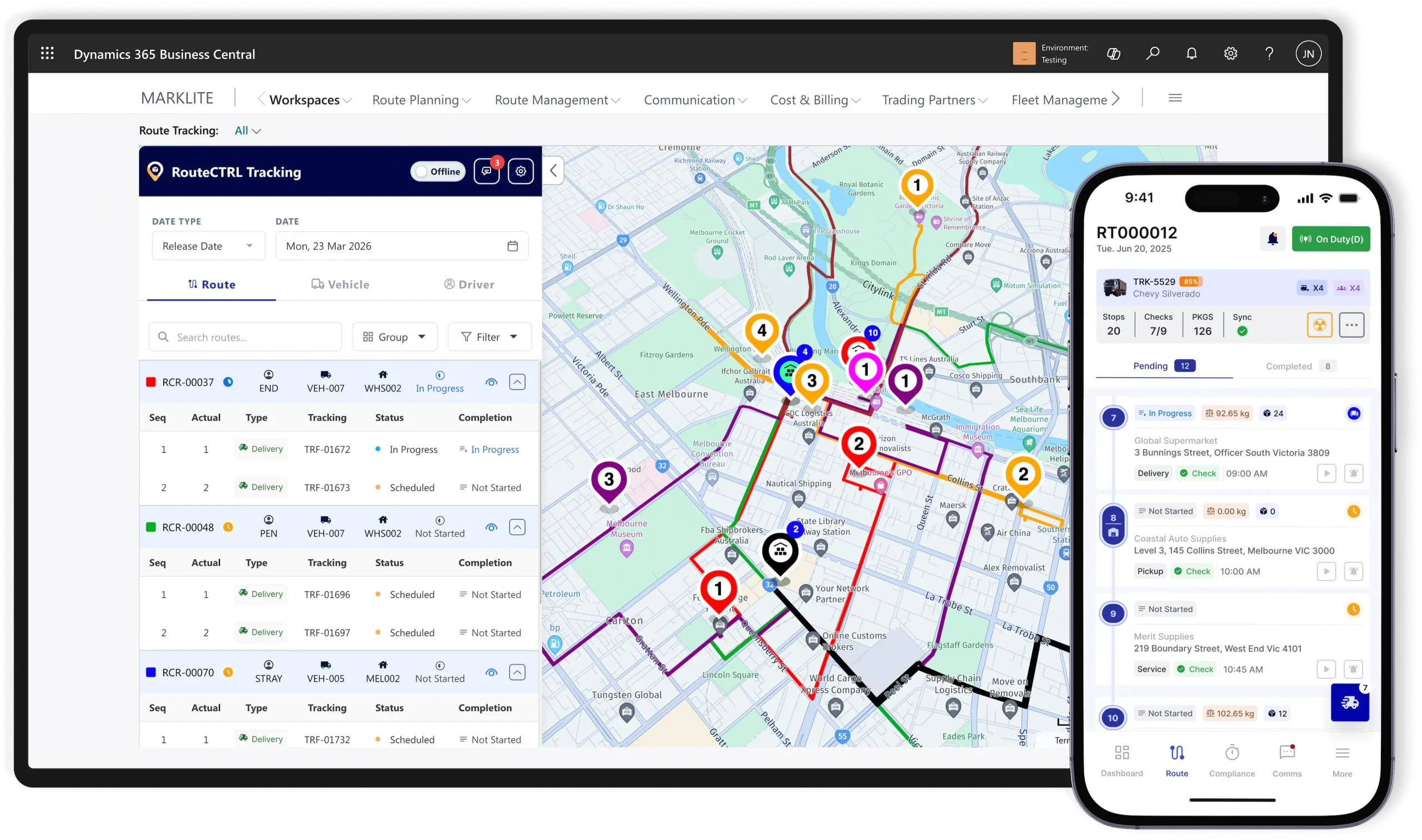
Teams can plan from business records, assign operators and vehicles, and release routes to the Operator App. Reported progress, check-ins, exceptions, and completion evidence give dispatchers information for coordinating active routes.
RouteCTRL supports Microsoft Dynamics 365 Supply Chain Management, Microsoft Dynamics 365 Business Central, Microsoft Dynamics 365 Sales, and Microsoft Power Platform. Deployment requirements and business-record handling depend on the Microsoft application you use.
In Dynamics 365 Business Central and Supply Chain Management, RouteCTRL brings transport planning and dispatch into the business application. Teams plan from existing business records, send assignments to the Operator App, and review reported outcomes against the related orders and shipments.
RouteCTRL connects service orders with technician scheduling, route planning, and mobile execution. Technicians receive assignments through the Operator App and submit progress updates, checklist responses, and completion evidence for office teams to review.
RouteCTRL is developed independently by Marklite. Microsoft does not own, endorse, or sponsor RouteCTRL. Microsoft application licenses are separate from RouteCTRL licenses.
Yes. Multi-site transport planning is available with RouteCTRL for Microsoft Dynamics 365 Supply Chain Management, Business Central, Sales, and Microsoft Power Platform. Teams can configure planning rules, resource assignments, and user access around each site’s operational requirements.
Implementation depends on your workflows, data readiness, configuration, and required applications. The scope should cover planning rules, resource records, user access, mobile workflows, testing, and training before rollout.
For Dynamics 365 Business Central and Supply Chain Management, customers or their Microsoft partners can implement RouteCTRL using the supplied documentation and standard guidance. RouteCTRL-led implementation is an optional service for larger deployments.
Requirements depend on the Microsoft application and the workflows you intend to use. Establish the required subscriptions, user access, business records, resource data, and external services before configuration. A Dynamics 365 Business Central environment is not a universal requirement for every RouteCTRL deployment.
RouteCTRL adds ERP-embedded transport planning and dispatch to Microsoft Dynamics 365 Supply Chain Management. Planners use existing business records to organize routes, assign resources, and release assignments to the Operator App. Reported execution outcomes remain connected to the related orders and shipments.
RouteCTRL lets Dynamics 365 Supply Chain Management planners select the orders to include, apply reusable order selection presets, and organize the selected demand into routes. Planners review resources and stop requirements before generating and releasing the route, so the assignment starts from the business records already in Supply Chain Management.
RouteCTRL uses recorded resource availability, vehicle capacity, and capabilities to support operator and vehicle assignment. Dynamics 365 Supply Chain Management planners review those records against route requirements before release. Accurate availability and capability records help prevent assignments that cannot meet the planned activity.
RouteCTRL supports multi-site transport planning with Microsoft Dynamics 365 Supply Chain Management, Business Central, Sales, and Microsoft Power Platform. Teams configure planning rules, resource assignments, and user access around each site’s requirements. For Supply Chain Management deployments, licensing and operational setup must also account for the legal entities involved.
The RouteCTRL Operator App sends delivery confirmations, operator check-ins, route progress, and checklist responses when connected. Dynamics 365 Supply Chain Management office teams review the returned execution information through the configured workflow. Activity recorded offline reaches the office after the device reconnects and synchronizes.
RouteCTRL delivery completion records the operator’s reported outcome and proof. Shipment posting, inventory updates, and invoicing are separate Dynamics 365 Supply Chain Management processes. Any automation of those actions must be defined in the implementation scope rather than inferred from a completed stop or captured signature.
A RouteCTRL implementation in Dynamics 365 Supply Chain Management covers planning rules, resource records, user access, mobile execution, testing, and training. Customers or their Microsoft partners can use the supplied implementation documentation and standard guidance. RouteCTRL-led implementation is an optional service for larger deployments.
A RouteCTRL feature license applies to one Dynamics 365 Supply Chain Management legal entity. Last Mile & Fleet Operations requires an initial minimum purchase of five vehicle licenses, while Field Service has a separate feature license. Additional access, resources, and services are licensed where required. Microsoft licenses remain separate.
RouteCTRL brings ERP-embedded route planning and dispatch into Microsoft Dynamics 365 Business Central. Teams plan from existing business records, send assignments to the Operator App, and review returned execution information alongside related orders and shipments.
RouteCTRL supports manual route planning in the Map Planner and route-option comparison in the Optimizer. In Dynamics 365 Business Central, the chosen Optimizer option creates a subplan for review. Planners then generate the route, open it, and release the reviewed assignment to the Operator App.
RouteCTRL connects Dynamics 365 Business Central service orders with technician scheduling, route planning, and mobile execution. Technicians receive their assignments in the Operator App and submit progress, checklist responses, and completion evidence for office teams to review against the service activity.
RouteCTRL can combine deliveries, pickups, and service visits within the same Dynamics 365 Business Central route. Planners account for each stop’s appointment window, expected service duration, and resource requirements, rather than treating every stop as an identical activity.
Dynamics 365 Business Central users select Retrieve update to retrieve the execution information reported through the RouteCTRL Operator App. Office teams use those updates to review route progress and outcomes. Mobile activity recorded offline must synchronize before the returned information can be retrieved.
RouteCTRL mobile completion records the stop outcome and supporting evidence. Dynamics 365 Business Central shipment posting, inventory updates, and invoicing remain separate actions. The implementation must specify which posting steps are automated and which require an office action.
Customers or their Microsoft partners can implement RouteCTRL in Dynamics 365 Business Central using the supplied documentation and standard guidance. The scope should cover data readiness, planning rules, user access, mobile workflows, testing, and training. A RouteCTRL-managed implementation can be scoped separately.
A RouteCTRL feature license applies to one Dynamics 365 Business Central company. Last Mile & Fleet Operations has an initial minimum purchase of five vehicle licenses. Field Service uses a separate feature license, with additional users, resources, and services licensed where required. Business Central licensing is separate.
RouteCTRL Command Center is a browser dashboard for monitoring route progress, vehicle and asset locations, incidents, and operational events. Dispatchers and fleet teams use the data supplied by connected applications and tracking services to investigate delays, movements, and exceptions.
A Dynamics 365 user license is not required solely to access the RouteCTRL Command Center browser dashboard. Users need a RouteCTRL Command Center user license. Access to connected Microsoft applications remains subject to those applications’ own licensing requirements.
RouteCTRL Command Center uses information from connected business applications, the Operator App, and configured tracking services. Device-based GPS and telemetry require compatible hardware, connectivity, and service configuration. Operator App activity is a separate source, so the available data can differ between vehicles.
RouteCTRL Command Center uses geofences to define boundaries around depots, customer sites, and other locations. Entry and exit events from the configured tracking source show when a vehicle crossed a boundary, helping teams investigate arrivals, departures, and unexpected movement.
RouteCTRL Command Center provides tracking history and playback for recorded vehicle activity. Teams can review the available trip, stop, and event records when investigating a delay or unusual movement. The level of detail depends on what the connected source captured.
RouteCTRL Command Center displays incidents and available device events, including supported speed and driving-behavior events. The connected device and service determine which signals are supplied. Fleet teams review the event records and their context before deciding what follow-up is needed.
RouteCTRL Command Center provides monitoring and investigation through a browser dashboard. Route planning, resource assignment, and release take place in the relevant RouteCTRL Microsoft application. The dashboard provides visibility into connected activity rather than replacing the planning workflow.
The RouteCTRL Customer Portal shows available shipment statuses, estimated arrivals, delivery or pickup progress, and proof of delivery. Customers can follow individual shipments linked to an order reference, helping them check progress without asking the office for every update.
Customers can download electronic proof of delivery, or ePOD, through the RouteCTRL Customer Portal when a proof document is available and publishing is enabled. The document provides the recorded delivery evidence for review. Document availability follows the configured shipment and proof workflow.
The RouteCTRL Customer Portal can allow delivery-instruction changes after dispatch where that capability is enabled. The configured workflow determines which changes customers may make and how revised instructions reach the operator. Teams should define those permissions before making the capability available.
The RouteCTRL Customer Portal records customer ratings and comments alongside shipment records. Office teams can review the feedback in the context of the delivery, investigate service concerns, and decide whether the customer or operator needs follow-up.
RouteCTRL Customer Portal access uses configured roles and customer or vendor account associations. Authorized users can access the information assigned to their account. Deployment testing should confirm those account associations and permissions before customer access is enabled.
A RouteCTRL Customer Portal shipment needs an available proof record and an enabled publishing workflow before a customer can download proof. Carrier shipments also depend on the evidence supplied by the carrier or service. A delivered tracking status alone does not establish that a proof document exists.
Customer Portal deployment includes configuring access, making the relevant shipment records available, and testing permissions and customer workflows. The scope depends on the selected portal capabilities and the existing RouteCTRL and Microsoft environment. Teams should test shipment visibility and proof availability before inviting customers.
Operators download the RouteCTRL Operator App from Google Play or the Apple App Store, and their organization configures access. Full delivery or technician workflows require an Operator App license. Each vehicle license includes one, while Secondary Operator licenses include limited access for supported crew activities.
The RouteCTRL Operator App works offline with downloaded routes and maps. Operators can scan packages, complete checklists, record outcomes, and capture proof without an internet connection. Updates stay on the device and synchronize when connectivity returns.
The RouteCTRL Operator App compares scanned packages with the packages expected at the assigned stop. Operators can identify a mismatch and record the supported exception with evidence before confirming the handover, helping the office investigate what occurred.
The RouteCTRL Operator App provides HERE turn-by-turn navigation using supported vehicle-routing profiles. Navigation guides travel between stops, while route planning sets the stop sequence and assignments. Teams must keep the vehicle information used for routing accurate.
The RouteCTRL Operator App sends delivery confirmations, operator check-ins, route progress, and checklist responses through the connected workflow. Updates reach office teams when connectivity allows. Information recorded offline synchronizes after reconnection and then follows the relevant application’s update process.
Operators complete configured safety-inspection checklists in the RouteCTRL Operator App and record responses, notes, and photos. Office teams review the submitted findings to investigate faults and arrange follow-up. Inspection records provide evidence of the checks performed.
The RouteCTRL Operator App records stop outcomes and supporting signatures, photos, and notes. The evidence remains associated with the assigned stop so office teams can investigate a disputed handover, an incomplete delivery, or a service-visit outcome.
RouteCTRL Reporting and Analytics covers delivery performance, fleet utilization, operator activity, and transport costs through Microsoft Fabric and Power BI. The supplied report pack, data model, setup work, and refresh arrangements should be established in the deployment scope.
RouteCTRL reports can be adapted for planning, fleet, service, and finance teams using RouteCTRL semantic models. Teams define the decisions each report supports, the required measures, and the data needed to calculate them. Report customization is scoped around those requirements.
RouteCTRL reports support planned-versus-actual transport cost analysis by route, vehicle, and operator. Teams can investigate the recorded variances and identify where planning, resource allocation, or pricing needs review. The comparison depends on having the relevant planned and actual cost records.
RouteCTRL report freshness depends on when operational updates reach the source application and when the reporting data refreshes. A mobile update is not necessarily visible in Power BI immediately. The deployment should establish the refresh schedule and expected reporting delay.
RouteCTRL reporting uses the route, delivery, operator, fleet, and cost records included in its reporting model. Measures depend on the source fields populated for those records. Teams should define the included entities and required fields when establishing the report scope.
RouteCTRL reporting can analyze delivery performance, including on-time and in-full results, where the required operational data is available. Teams must agree the delivery commitment, completion timing, quantity rules, and measure definitions so the reported result has a consistent business meaning.
Microsoft Fabric and Power BI licensing is separate from RouteCTRL licensing. Requirements depend on the reporting deployment, intended viewers, capacity, and access arrangements. Establish the Microsoft license requirements alongside the report scope before confirming the total deployment cost.
RouteCTRL welcomes partnership discussions with Microsoft implementation and reseller partners, as well as businesses introducing customer opportunities. Share the applications you support, the industries you serve, and your proposed role so the team can assess the partnership fit.
Use the partner registration form to introduce your practice and describe a current opportunity or recurring customer requirement. The initial discussion covers product fit, onboarding requirements, commercial terms, and responsibilities across sales, implementation, and ongoing support.
A referral arrangement can focus on introducing customer opportunities rather than delivering the implementation. Discuss your intended involvement with RouteCTRL so responsibility for qualification, demonstrations, proposals, deployment, and support is clear before proceeding.
RouteCTRL offers sales and demonstration support to help partners assess product fit and prepare relevant customer scenarios. Bring the prospect’s Microsoft application, operational requirements, and key evaluation questions so the demonstration addresses the decisions the customer needs to make.
RouteCTRL provides product training covering its capabilities and operational workflows. Partners can use this knowledge to assess requirements and demonstrate relevant scenarios. Discuss the training scope for your sales, functional, and technical teams during onboarding.
For Microsoft Dynamics 365 Business Central and Supply Chain Management, partners can implement RouteCTRL using the supplied documentation and standard guidance. Define configuration, integration dependencies, testing, training, and rollout responsibilities before delivery. RouteCTRL-led implementation can be scoped separately.
Customer support responsibilities should be agreed between the partner and RouteCTRL before rollout. Establish the customer’s first point of contact, the route for escalating product issues, and ownership of configuration changes and ongoing services. Document these responsibilities in the customer delivery scope.
Bring the customer’s requirements to RouteCTRL for review before promising a customization. Separate requirements that existing capabilities or configuration can address from those needing integration or development. Agree the supported approach, delivery responsibility, cost, and implications for future updates before committing to the customer.
Commercial terms are discussed with RouteCTRL as part of the proposed partnership. Confirm the applicable referral or reseller arrangement, payment conditions, and responsibilities for customer billing and renewals before making a proposal. Any fees, margins, or other commitments must follow the agreed terms.
RouteCTRL is relevant when customers need to connect business records with transport planning, dispatch, fleet management, field service, or execution visibility. It supports Microsoft Dynamics 365 Supply Chain Management, Business Central, Sales, and Microsoft Power Platform. Partners should assess the operational requirement alongside the customer’s application environment.
Yes. Connect your existing carrier accounts through supported integrations. Booking, rate comparison, labels, and tracking depend on the capabilities available for the selected carrier connection.
Yes. Upload a shipment spreadsheet, map its columns, check the rows, and create the shipments as a batch. Save the mapping for subsequent imports or start with the downloadable template.
Yes. Configure incident rules for early or late delivery, late pickup, missing tracking updates, repeated schedule changes, recurring late deliveries, and frequent rescheduling. Your team can also record shipment incidents manually.
RouteCTRL plans last-mile routes around customer delivery windows, vehicle capacity, and shipment requirements. Planners review the stop sequence, estimated distance, duration, costs, and vehicle utilization before release. The Map Planner allows them to adjust the proposed plan.
Dispatchers assign operators and vehicles in RouteCTRL and release the reviewed route to the Operator App. Operators receive their stops and instructions through the app. Returned check-ins, exceptions, progress, and completion evidence help the dispatcher coordinate the active delivery route.
At a last-mile stop, the RouteCTRL Operator App checks scanned packages against the packages expected for that assignment. A mismatch can be identified before handover, and the operator can record the supported exception and evidence for office review.
Last-mile operators use HERE turn-by-turn navigation inside the RouteCTRL Operator App with supported vehicle-routing profiles. Planners determine the stop sequence and resource assignment before release. Navigation then guides the operator between the planned stops using the recorded vehicle information.
The RouteCTRL Customer Portal provides available shipment statuses, estimated arrivals, and delivery progress for last-mile customers. Where proof is available and publishing is enabled, customers can download the proof document. Multiple shipments under one order reference can be followed individually.
RouteCTRL proof of delivery records the reported handover and supporting evidence. Business-application shipment posting, inventory updates, and invoicing are separate processes. The implementation must specify any posting automation, so a signature or completed stop is not mistaken for an invoice being created.
RouteCTRL last-mile operators can use downloaded routes and maps, scan packages, record delivery outcomes, and capture proof offline in the Operator App. The device retains those updates until connectivity returns. Office and customer visibility follows synchronization and the configured update workflow.
RouteCTRL supports field-service workflows with Microsoft Dynamics 365 Supply Chain Management, Business Central, Sales, and Microsoft Power Platform. Teams plan service visits and coordinate Operator App execution within the context of their chosen Microsoft application.
RouteCTRL supports field visits without a delivery order. A route may contain service visits, deliveries, or mixed activities. Planners account for the appointment and resource requirements of each stop when organizing the journey.
RouteCTRL planners match operators and vehicles against recorded capabilities and availability. Appointments requiring additional personnel can be coordinated with multiple technicians. Teams review the assignment when the schedule, required capabilities, or resource availability changes.
Technicians use configured checklists in the RouteCTRL Operator App to record service procedures, responses, inspection findings, faults, notes, and photos. Office teams review the submitted records to understand what was checked and what follow-up is required.
Technicians report visit progress, incidents, and exceptions through the RouteCTRL Operator App. Office teams use the returned information to review the affected appointment. Offline records synchronize after reconnection, so an office user may not receive an immediate update during a network outage.
RouteCTRL technicians can access downloaded routes, complete checklists, record visit outcomes, and capture proof offline in the Operator App. The app stores the activity on the device and synchronizes it when the connection returns.
RouteCTRL technicians record the visit outcome with available signatures, photos, and notes in the Operator App. Office teams review that completion information against connected business records. Posting, inventory updates, and invoicing follow the business application’s configured process separately from mobile proof capture.
RouteCTRL fleet planning uses vehicle and trailer records, capacity, capabilities, and availability. These records establish which resources can be considered for a route. Teams need current resource records to assess whether an assignment is practical.
RouteCTRL supports vehicle and trailer records in transport planning, including capacity and compatibility information. Planners review the resources against the route’s operating requirements before assignment. Vehicle and trailer availability must reflect the resources actually available for the journey.
Operators submit configured vehicle-inspection checklists through the RouteCTRL Operator App, with responses, notes, and photos. Fleet teams review the recorded findings to investigate faults and coordinate follow-up before making decisions about the vehicle.
RouteCTRL supports maintenance records alongside vehicle availability information. Fleet teams use these records when reviewing which vehicles are ready for assignment and arranging follow-up. The availability record must be kept current as the vehicle’s operating status changes.
Operators can record fuel and odometer readings through the RouteCTRL Operator App. Fleet teams use the captured records as inputs when reviewing vehicle use and costs. Consistent entries are necessary for comparisons across vehicles and reporting periods.
RouteCTRL’s available GPS and telematics information depends on compatible devices, connectivity, the configured tracking service, and the signals that service supplies. Device tracking is separate from Operator App execution updates. Hardware and signal coverage must be established for the intended deployment.
RouteCTRL supports comparison of planned and actual transport costs by route, vehicle, and operator. Fleet managers examine those records to identify where resource use or operating costs diverged from the plan, then decide which journey or activity requires investigation.
Yes. Through supported carrier integrations, RouteCTRL lets you create the carrier shipment and purchase its shipping label. Tracking-only carriers are booked externally, while manual carriers can be managed without an integration.
RouteCTRL Carrier Shipping supports Microsoft Dynamics 365 Supply Chain Management, Business Central, Sales, and Microsoft Power Platform. Order records and accounting actions follow the supported workflow configured for the chosen application.
Yes. RouteCTRL supports shipment creation from sales orders, purchase orders, transfer orders, and service jobs. You can also create a shipment or add to one directly from sales order lines.
Yes. RouteCTRL supports package-level tracking, with updates retrieved on a schedule or on demand where supported by the carrier connection or tracking service. Manual carriers can be managed without automatic tracking.
Yes. RouteCTRL retrieves available quotes from connected carriers so you can compare services before booking.
Shipments can be shared through the configured Customer Portal workflow so customers can follow delivery progress. RouteCTRL also supports viewing and downloading available carrier proof of delivery. A delivered status does not by itself establish that a proof document is available.
Licensing combines operational feature licenses with additional access, resource, and service licenses where required.
A feature license applies to one Dynamics 365 Business Central company or one Supply Chain Management legal entity. Last Mile & Fleet Operations requires an initial minimum purchase of five vehicle licenses. Field Service has a separate feature license.
Licensing Last Mile & Fleet Operations, Field Service, or both includes one shared RouteCTRL office-access entitlement per environment: one Administrator, one Functional Manager, and unlimited Read-Only Users.
Additional Administrator and Functional Manager users require additional RouteCTRL licenses. Microsoft licensing remains separate.
The published price list shows monthly rates for reference. Payment is billed annually in advance for a 12-month subscription term per licensed entity.
Microsoft Dynamics 365 licensing, tracking hardware, connectivity, and third-party messaging charges are separate unless specifically included in a quotation. Implementation, customization, and professional services may also be quoted separately.
Standard implementation documentation and guidance are distinct from a RouteCTRL-managed implementation service.
Additional vehicles, operators, users, and services can be licensed as requirements change. Configuration and rollout work depend on what is being added.
Additional quantities are priced under the terms applicable when purchased. Total licensed quantities are reassessed at renewal. Reductions and other subscription changes depend on the applicable agreement.
Discuss the proposed scope with RouteCTRL before committing to licenses. Confirm minimum quantities, duration, charges, success criteria, and how the pilot would move into a production subscription. Any proposed pilot arrangement should be assessed against the published licensing terms.
The RouteCTRL team can review your operational requirements, resource quantities, user roles, and optional services. Use that deployment scope and the current price list to establish the required license mix and expected charges before purchase.