
 Microsoft Dynamics 365 Supply Chain Management
Your supply chain doesn’t stop at dispatch. Neither does RouteCTRL.
Coordinate high-volume delivery operations across sites and legal entities with RouteCTRL for Dynamics 365 Supply Chain Management. Plan around the capacity, delivery commitments, and resource requirements of each location.
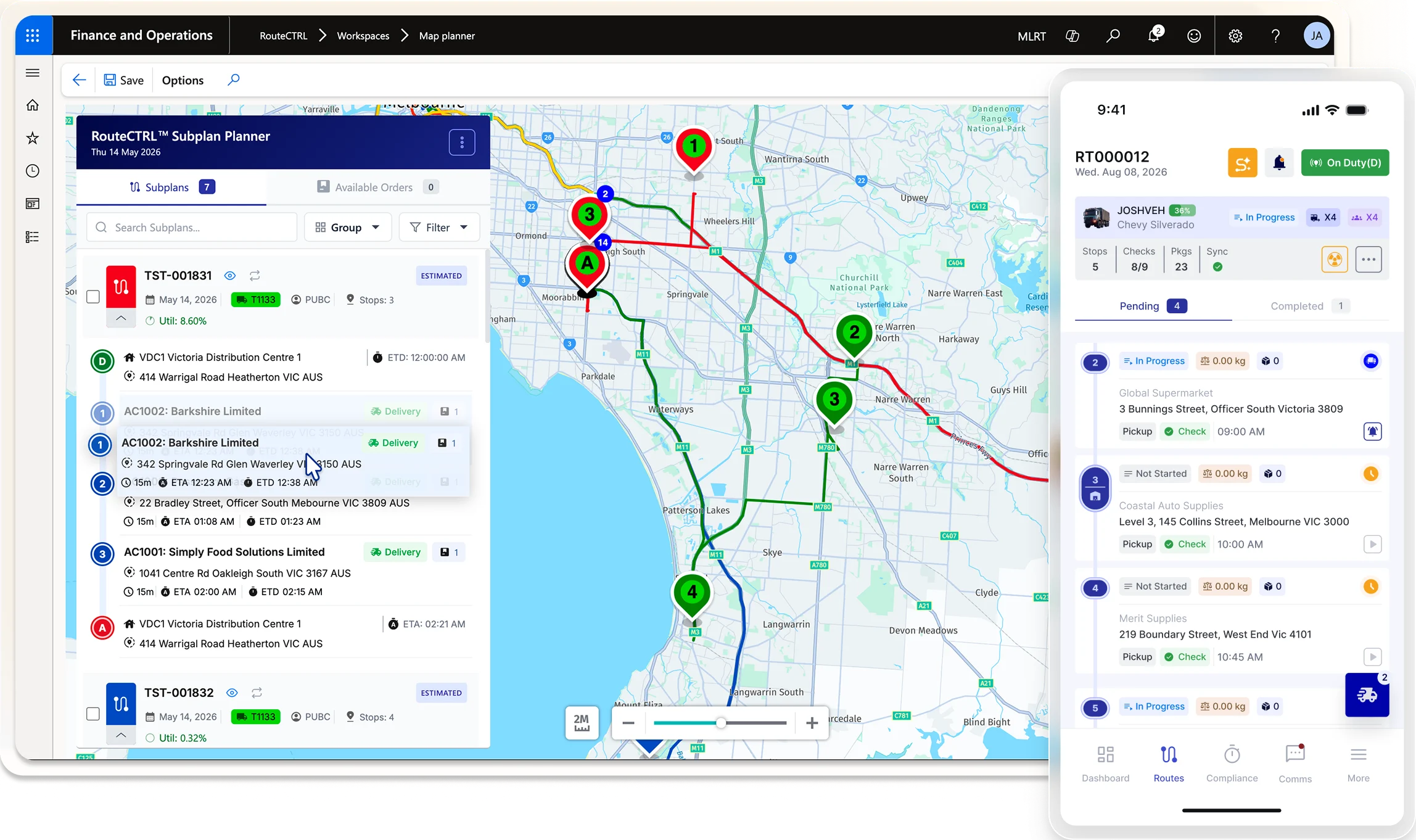
Why RouteCTRL
Extend your Dynamics 365 investment into delivery execution
-
Work within Dynamics 365
Plan and dispatch from existing business records to reduce duplicate entry across your supply chain and delivery teams.
-
Match resources to tasks
Match assignments to vehicle capabilities, driver qualifications and hours of service before releasing delivery routes.
-
Verify delivery outcomes
Give your teams delivery signatures and barcode checks to investigate discrepancies and confirm the completed delivery.
-
Calculate delivery costs
Calculate transportation charges by distance, time, weight, or volume to account for the requirements of each delivery.
Features
Explore what RouteCTRL brings to Microsoft Dynamics 365 Supply Chain Management
Planning
Route Planning
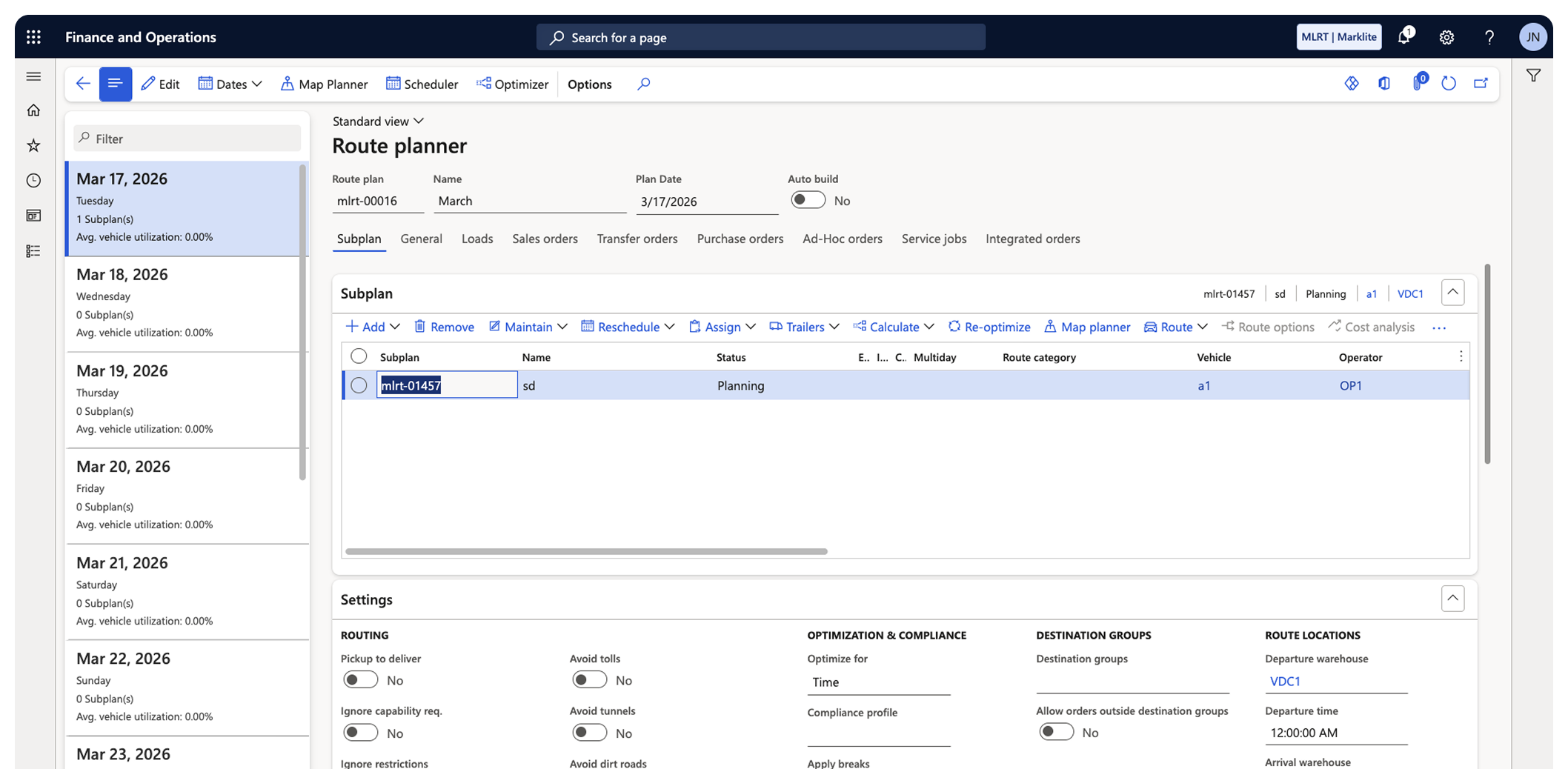
Organize a dated route plan with subplans, order categories, assigned vehicles, and routing preferences in Supply Chain Management.
- Review sales, transfer, purchase, ad-hoc, service, and integrated orders within the route plan.
- Check each subplan’s status and assigned vehicle.
- Set the departure warehouse, route times, and routing and optimization preferences.
Planning
Map Planner
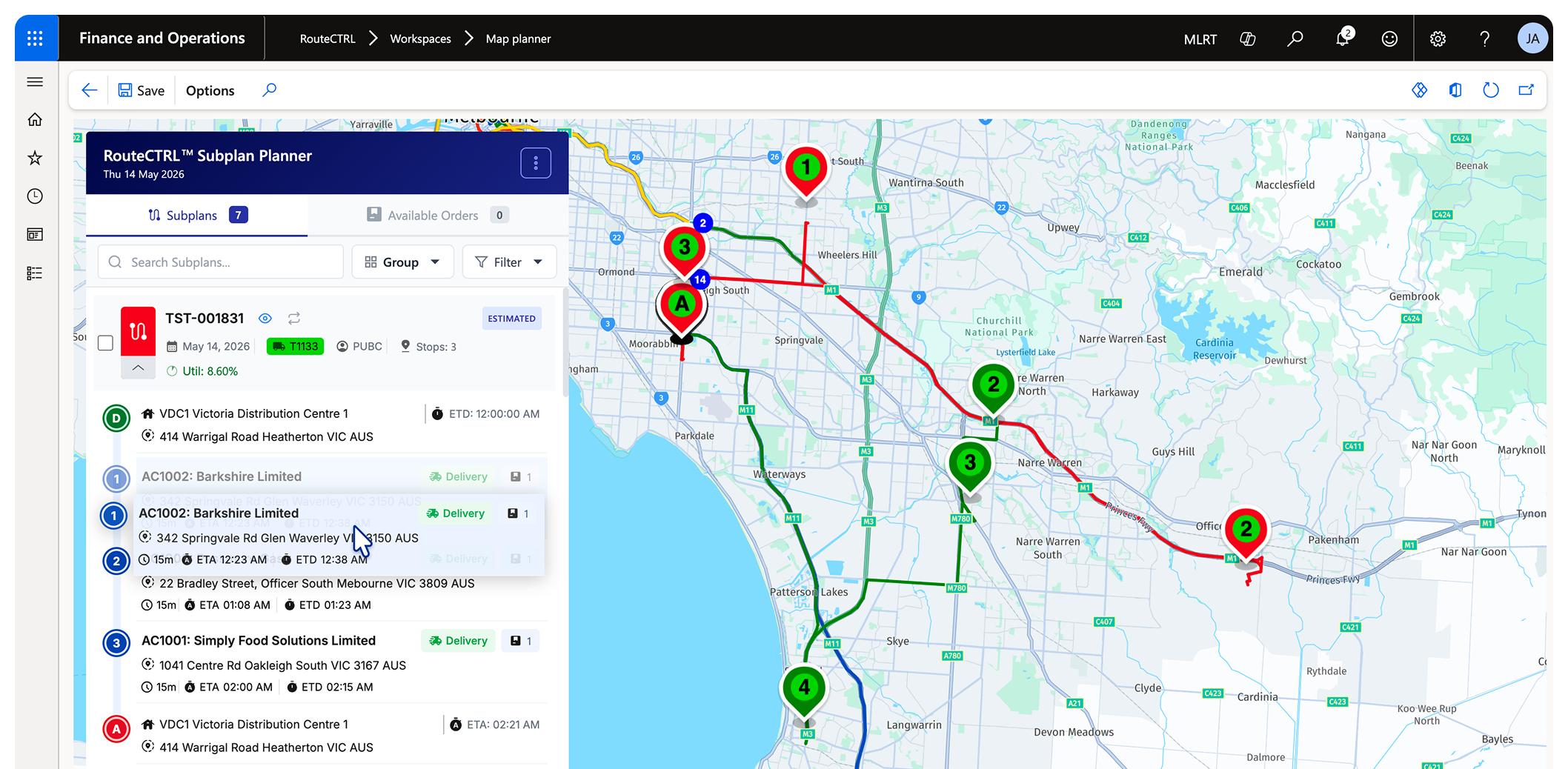
Review planned stops on the map alongside their sequence, estimated arrival times, and route totals.
- Follow the planned stop sequence between departure and arrival locations.
- Check stop addresses, service durations, and estimated arrival and departure times.
- Review route summaries for distance, duration, load, and estimated cost.
Optimization
Route Optimizer
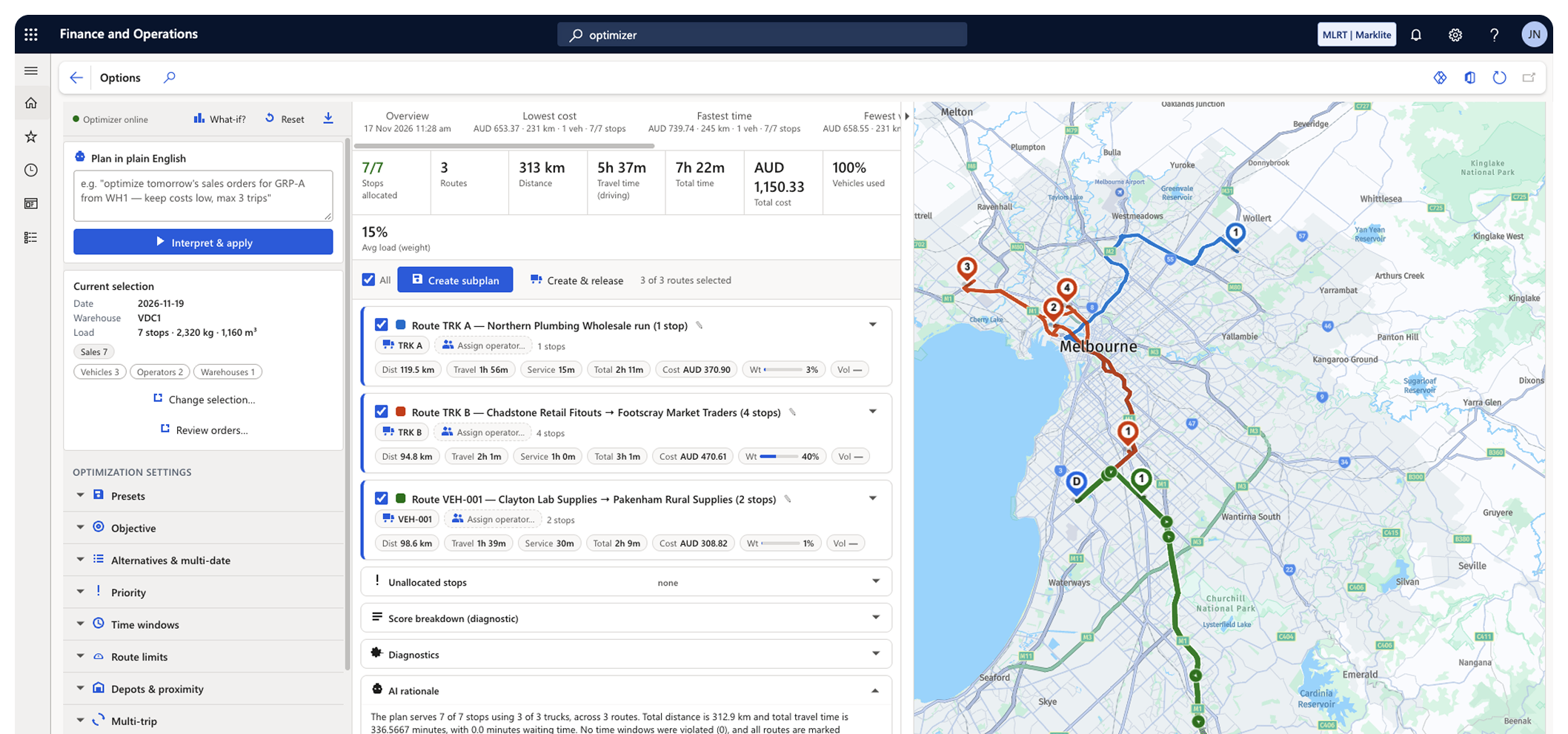
Find a route plan that fits your operational priorities. Use the Optimizer to evaluate alternatives before committing resources to execution.
- Describe route requirements in plain English to tell the Optimizer what you need the plan to achieve.
- Compare what-if scenarios before applying a plan, assessing how alternative choices affect estimated costs, travel times, and resource use.
- Optimize for lowest cost or fastest time, depending on whether the priority is controlling transport spend or shortening journeys.
Planning
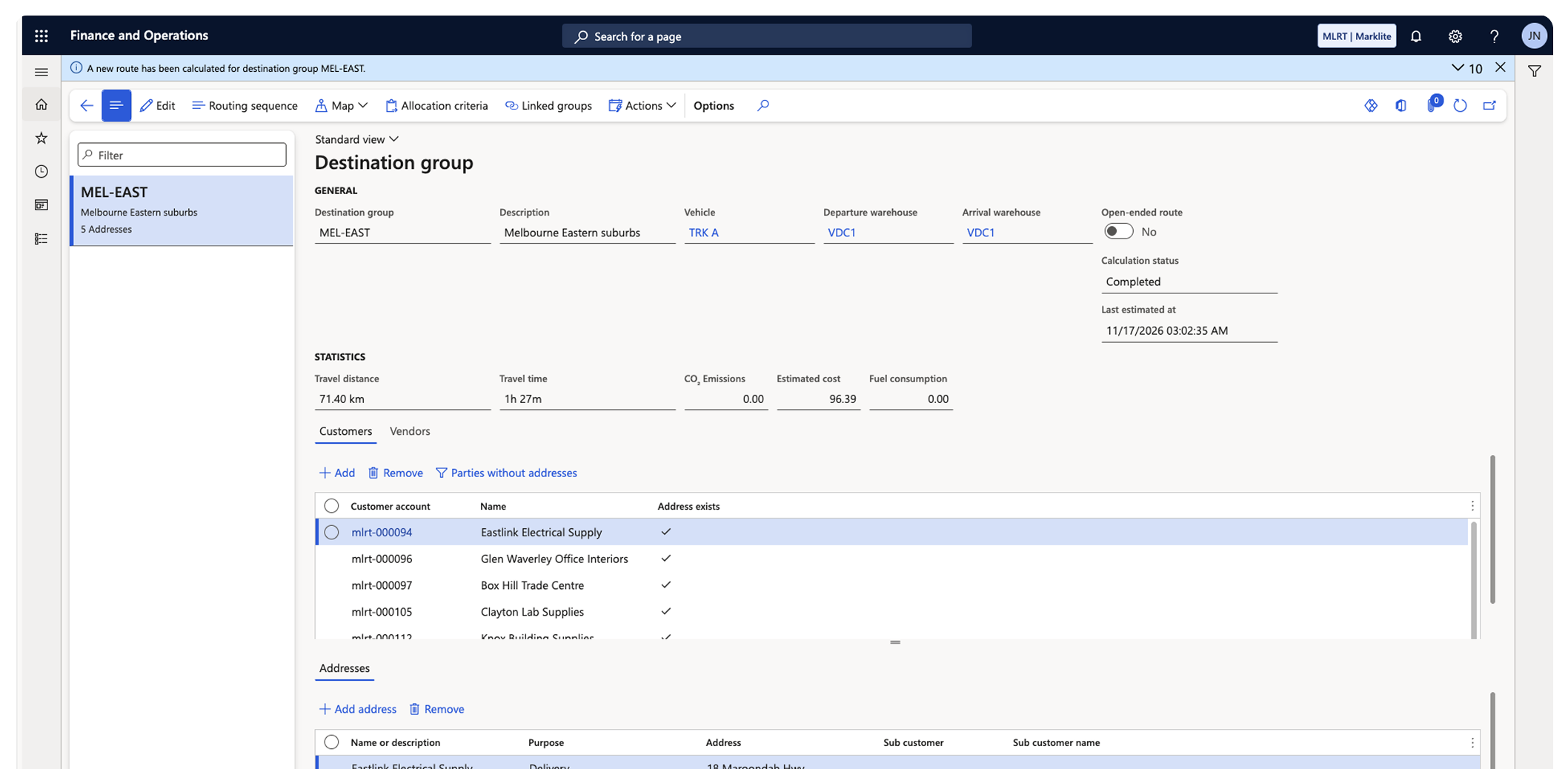
Destination Groups
Review the customer addresses, vehicle, and warehouses configured for a destination group, alongside its calculated route estimates.
- Review the customers and addresses included in the group.
- Check the assigned vehicle and departure and arrival warehouses.
- Review the calculated distance, travel time, and estimated cost.
Scheduling
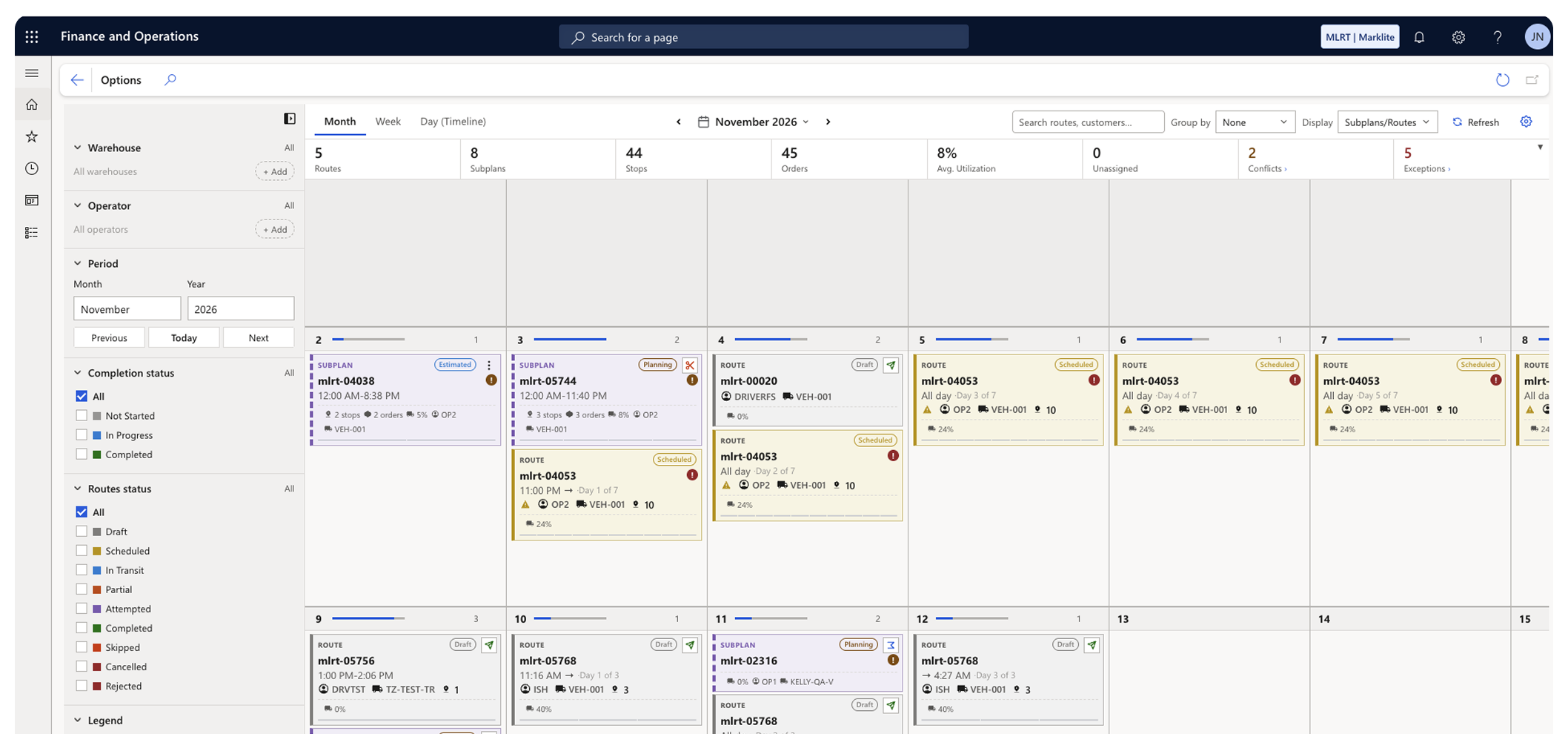
Route Scheduler
Review routes and subplans in a calendar, with their assigned resources, scheduled times, and completion status.
- Switch between month, week, and day timeline views.
- Filter the calendar by warehouse, operator, and route or completion status.
- Check scheduled assignments, utilization, and flagged exceptions for the selected period.
Scheduling
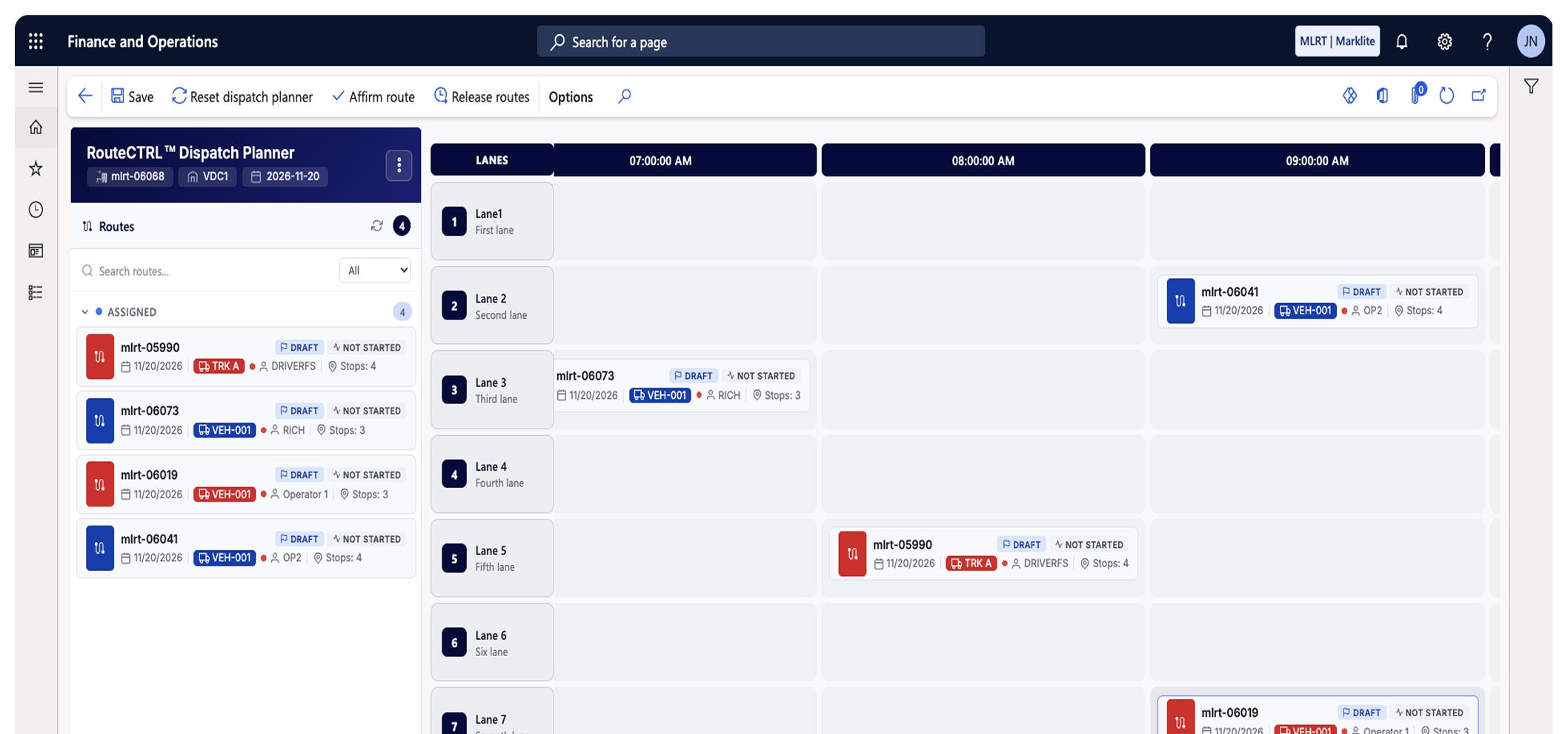
Dispatch Planner
Organize routes into departure lanes and time slots, with vehicle and operator assignments visible on each route card.
- Place routes in the relevant departure lanes and time slots.
- Check the assigned vehicle, operator, status, and stop count on each route card.
- Affirm reviewed routes and release them from the dispatch board.
Scheduling
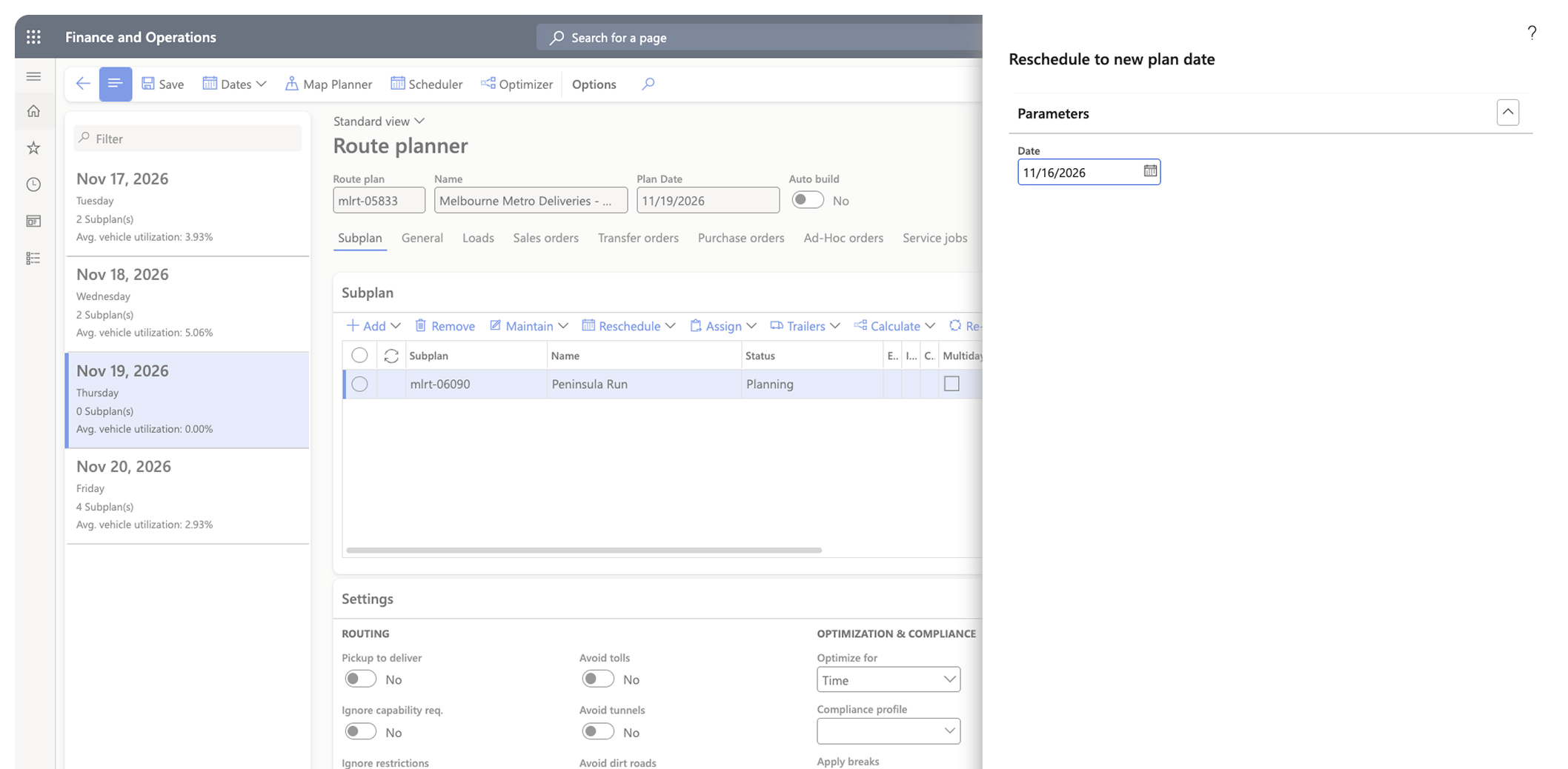
Route Rescheduling
Set a new plan date for selected routes or subplans when delivery and collection dates change.
- Identify the selected route plan or subplan before rescheduling.
- Choose the revised date in the rescheduling dialog.
- Confirm the new plan date for the selected assignment.
Fleet
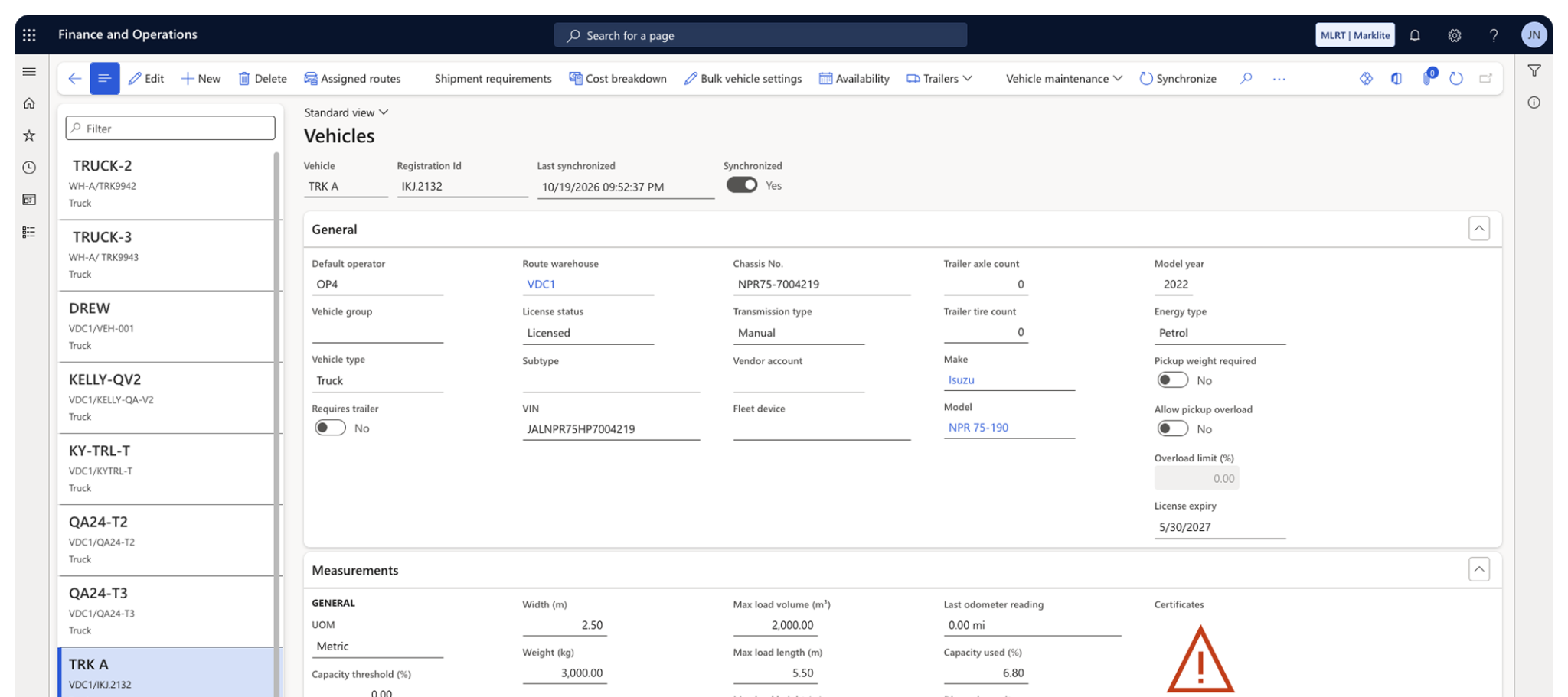
Vehicle Assignment Settings
Review a vehicle’s default operator, route warehouse, trailer requirements, and load measurements before selecting it for a route.
- Check the default operator and route warehouse recorded for the vehicle.
- Review vehicle type, trailer requirements, and licence expiry.
- Check recorded dimensions, load capacity, and certificate warnings.
Planning
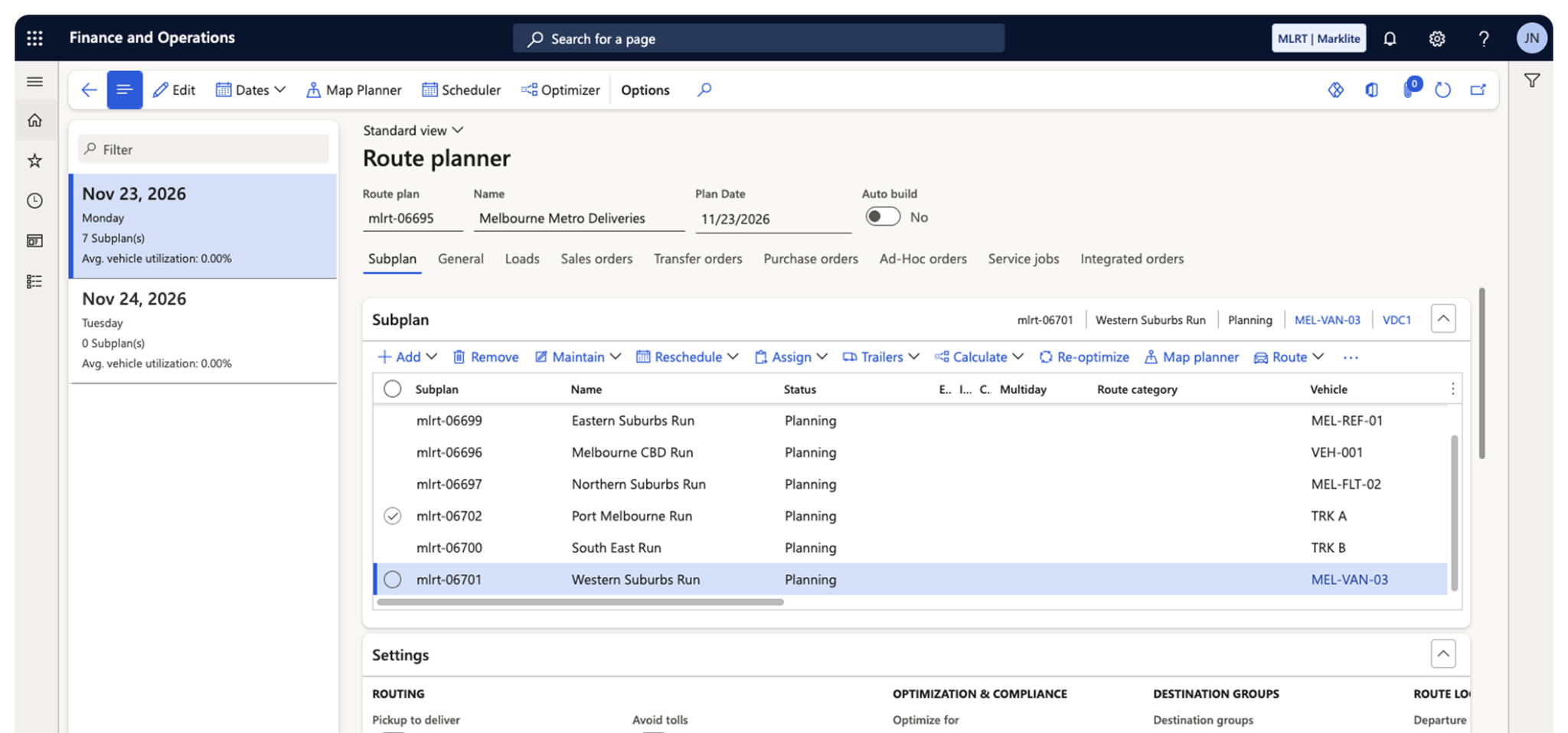
Subplan Management
Review the subplans within a dated route plan, including their planning status and assigned vehicles.
- Identify each subplan by its name and planning status.
- Check the vehicle allocated to each subplan.
- Access calculation and rescheduling actions for selected subplans.
Transport
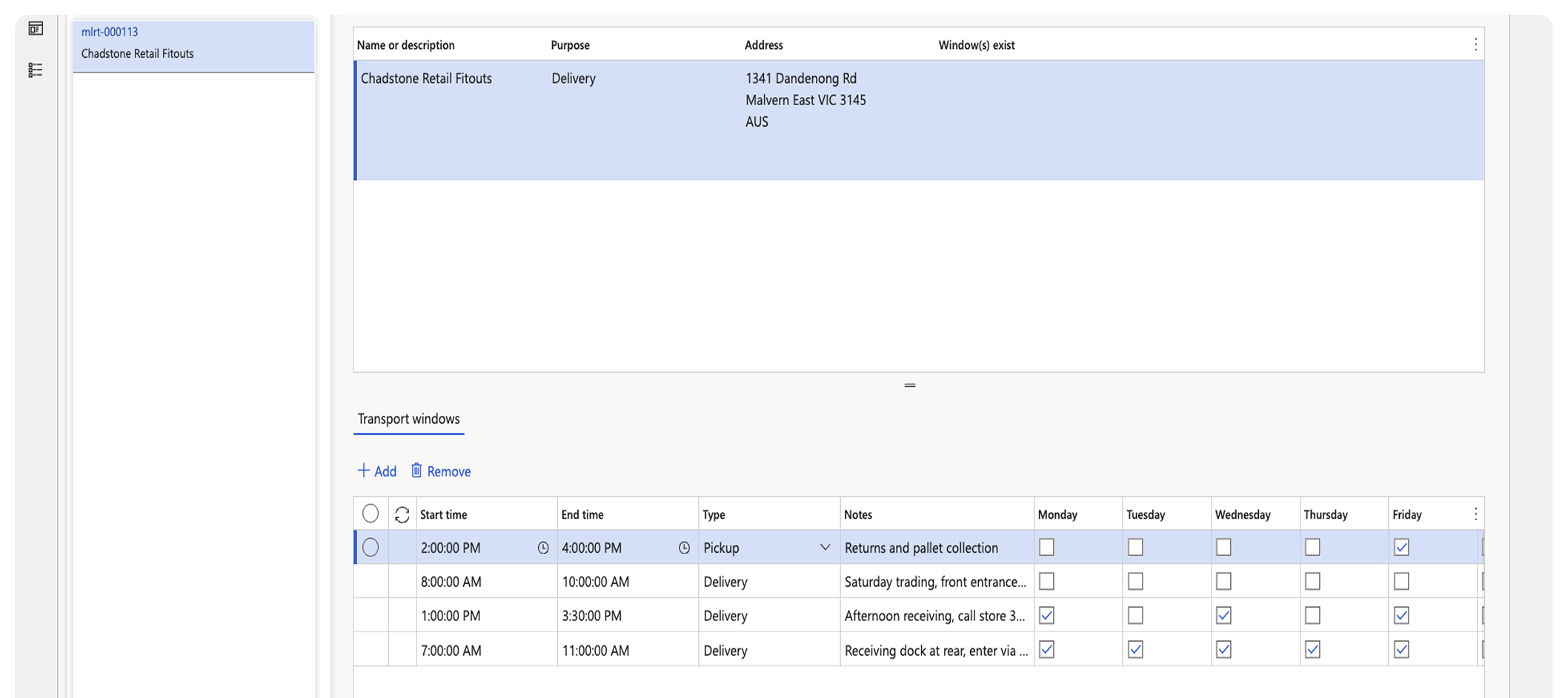
Transport Window Management
Define delivery and collection hours against customer addresses so planners can account for when handovers can take place.
- Set the start and end time for each address’s transport window.
- Specify the delivery or pickup window type and applicable weekdays.
- Add notes about receiving hours, access arrangements, or collection requirements.
Orders
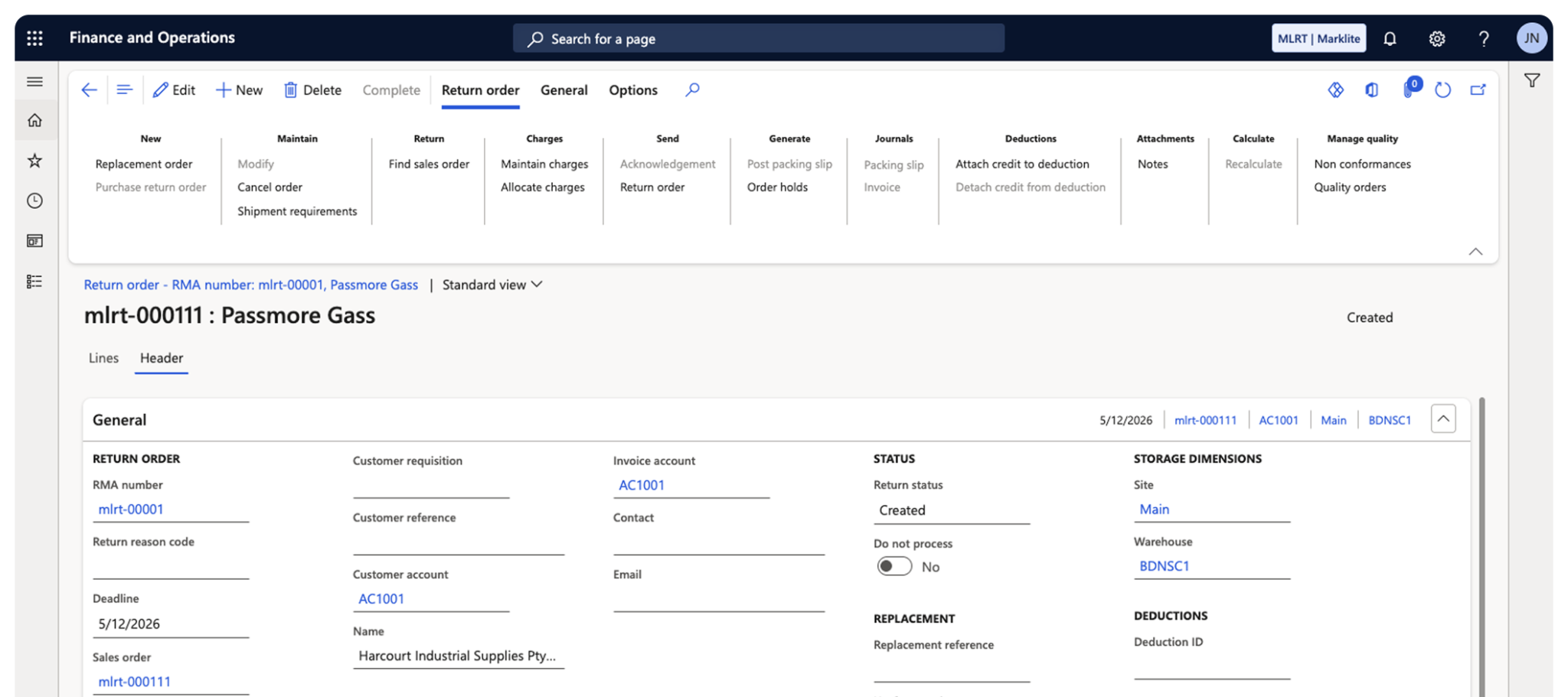
Returns Management
Review return orders with their RMA reference, customer, return status, and receiving warehouse.
- Identify the RMA number, customer account, and linked sales order.
- Check the return reason, deadline, and processing status.
- Review the receiving site and warehouse recorded against the return.
Transport
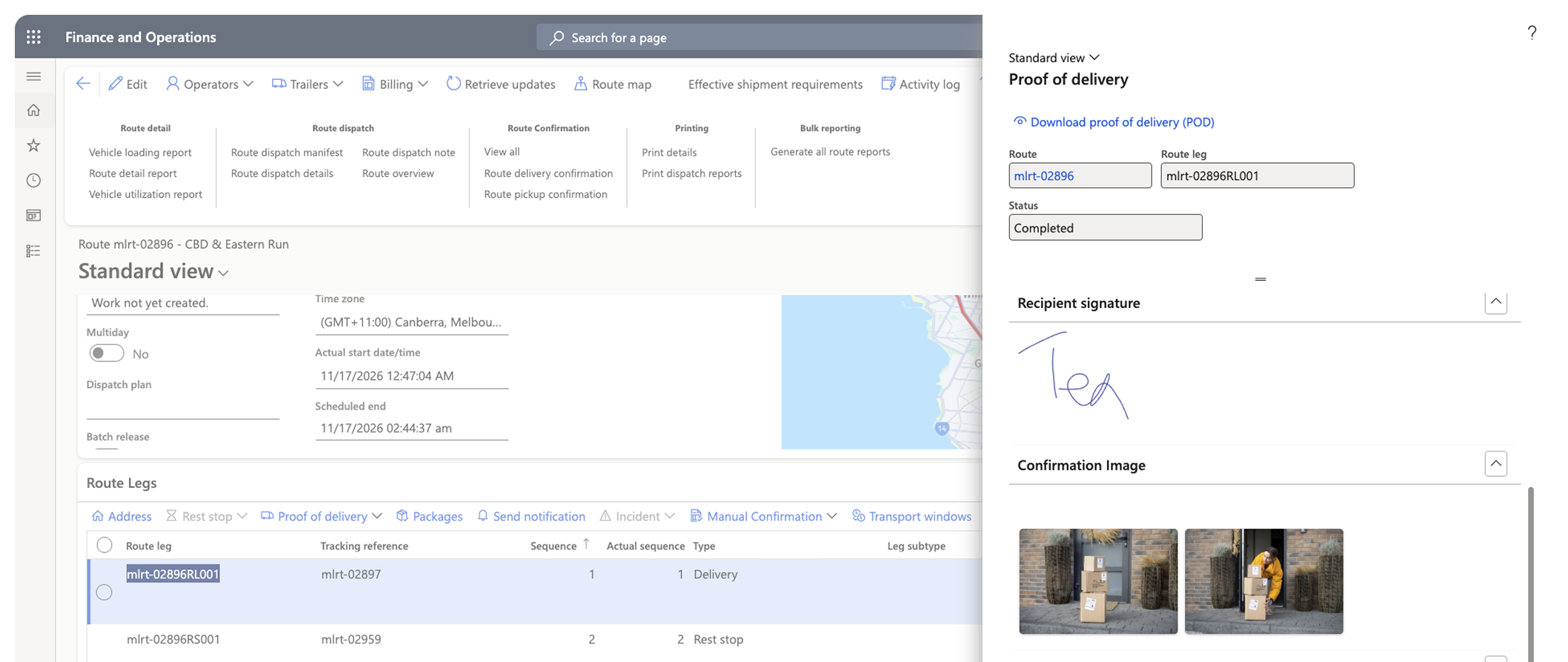
Proof of delivery (ePOD)
Review a completed delivery’s signature and confirmation images against its route and route-leg references.
- Check the selected route, route leg, and completion status.
- Review the recipient signature and confirmation images.
- Download the proof-of-delivery document from the completed record.
Loads
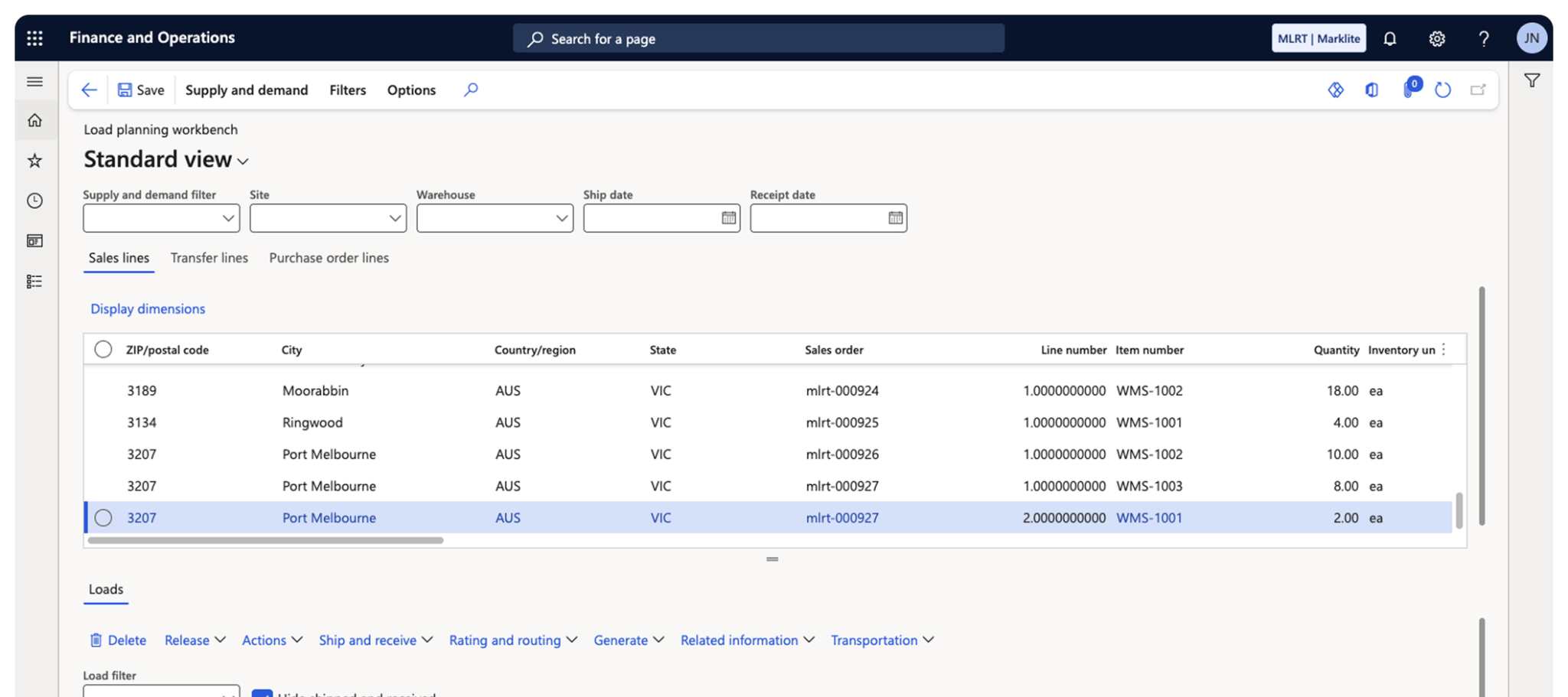
Route Loads
Organize sales, transfer, and purchase order demand into loads within the Supply Chain Management Load Planning Workbench.
- Filter order lines by site, warehouse, shipping date, or receipt date.
- Review destinations, items, and quantities before organizing loads.
- Access load release, shipping, rating, and routing actions from the workbench.
Loads
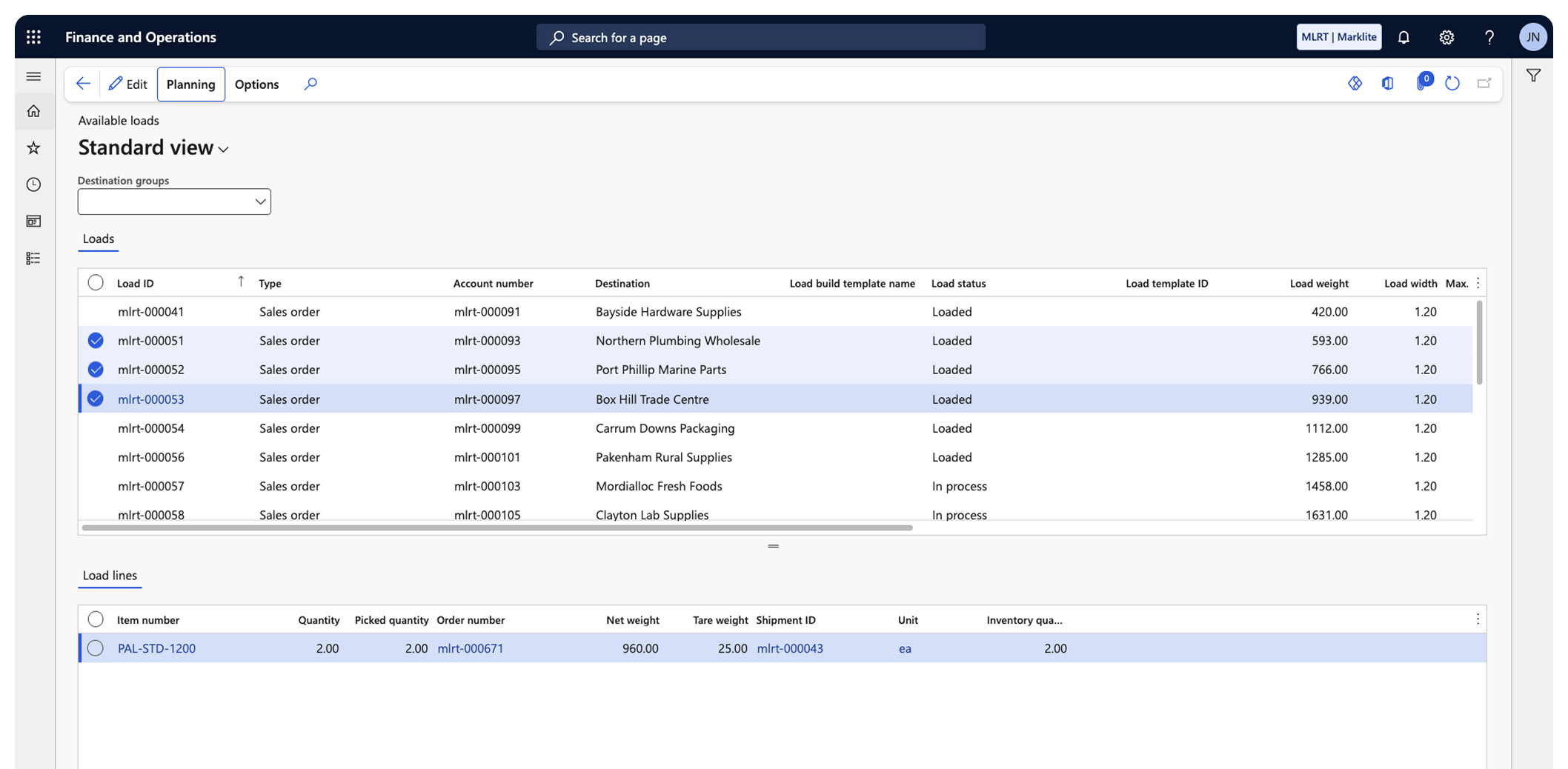
Load Selection
Review available loads and their contents before selecting them for route planning.
- Filter the available loads by destination group.
- Check each load’s destination, status, weight, and dimensions.
- Review load-line items, quantities, and related order and shipment references.
Warehouse
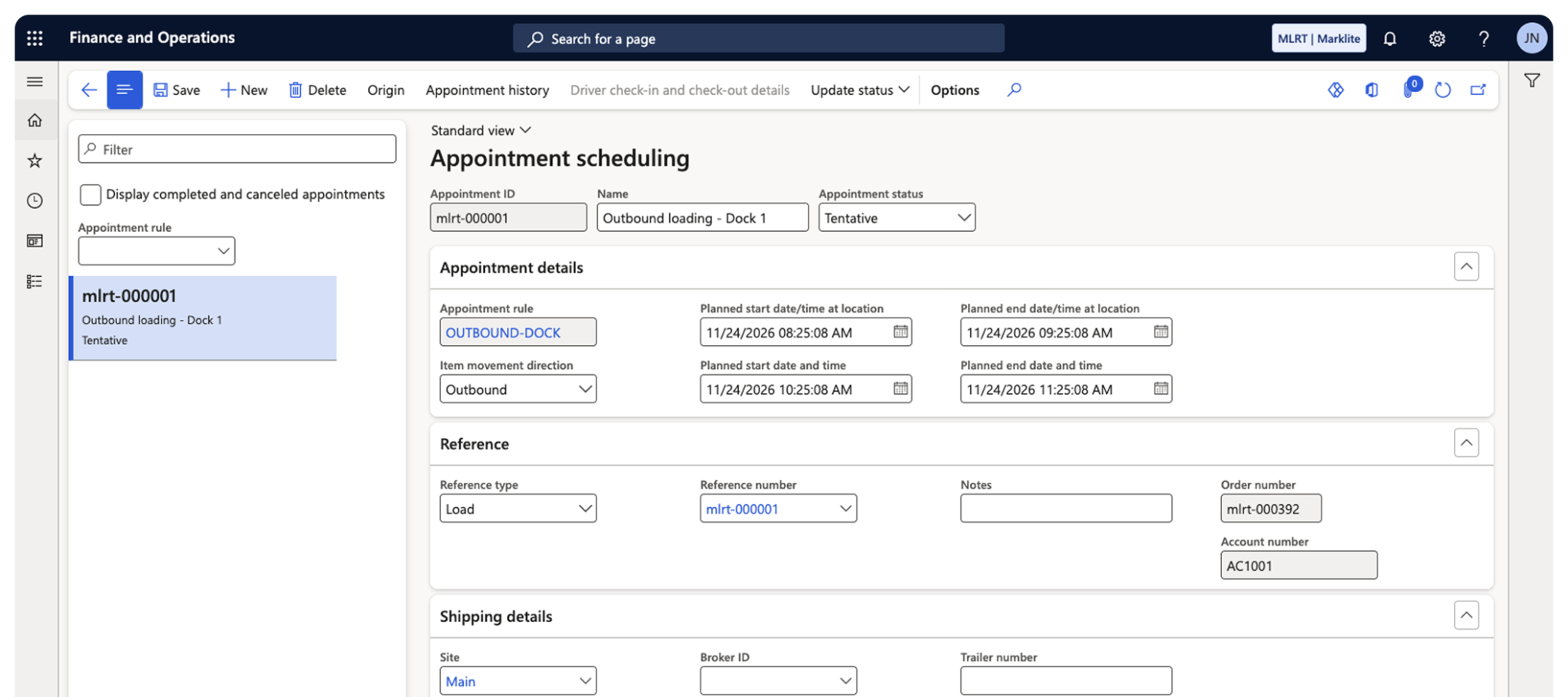
Dock Appointment Scheduling
Coordinate loading appointments against the relevant load, giving warehouse teams a defined preparation and handover window.
- Set the appointment rule, movement direction, and planned start and end times.
- Link appointments to the relevant load and order.
- Review appointment status and history as loading arrangements change.
Warehouse
Warehouse Shipments
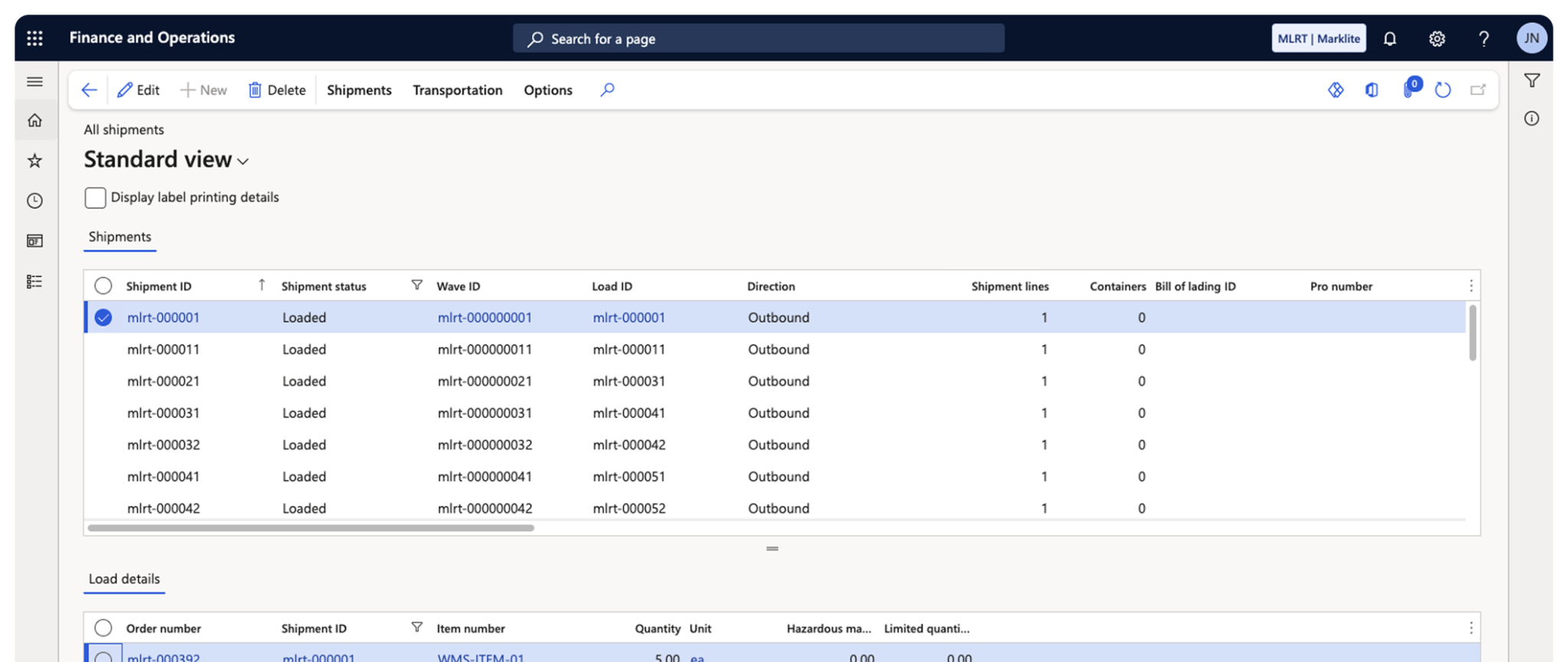
Review outbound shipment status, wave and load references, and item quantities in the Supply Chain Management shipment list.
- Check shipment status and the associated wave and load IDs.
- Review the selected shipment’s order, item, quantity, and unit details.
- Check shipment direction, container counts, and bill-of-lading references.
Fleet
Vehicle and trailer management
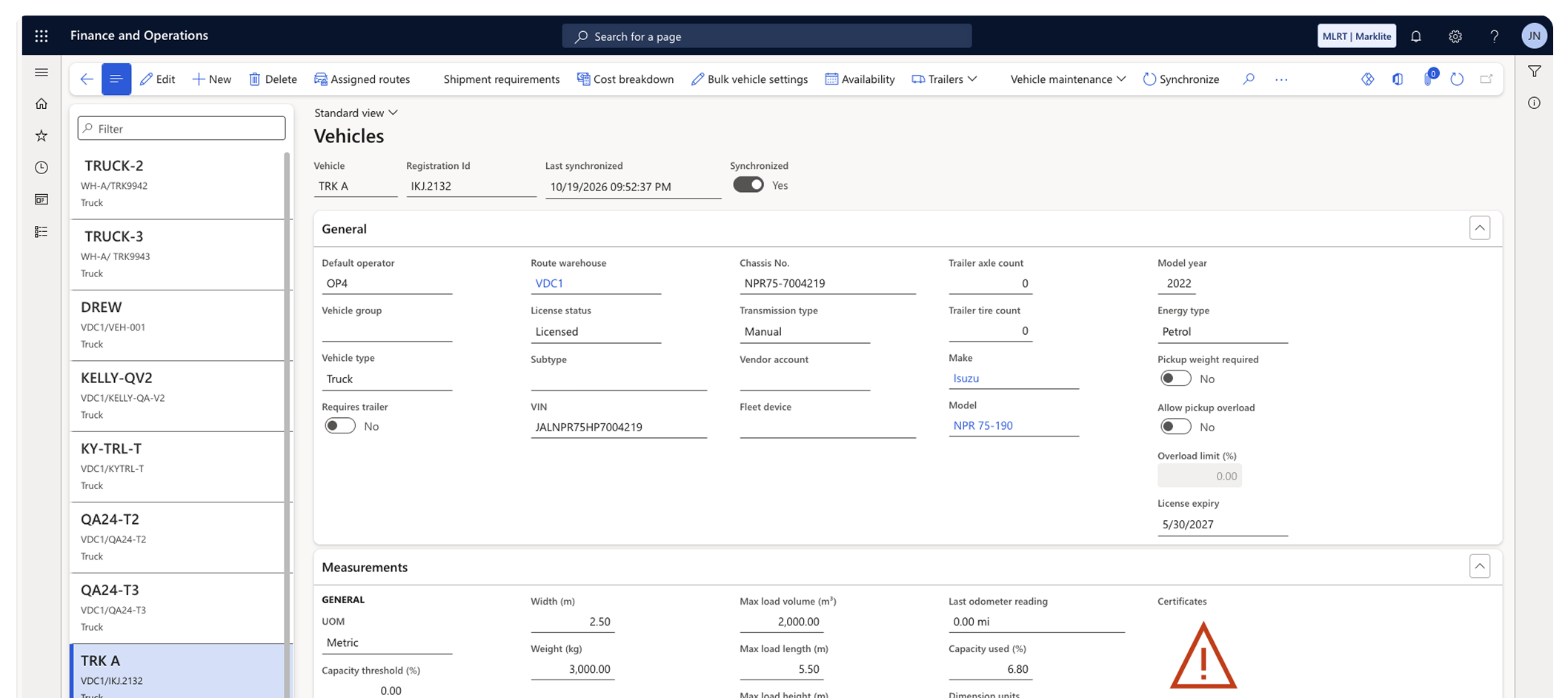
Review vehicle identity, operating specifications, and load measurements in the vehicle record.
- Record the vehicle type, VIN, registration, make, model, and energy type.
- Check the default operator, route warehouse, and trailer requirements.
- Review dimensions, load capacity, licence expiry, and certificate warnings.
Fleet
Vehicle Maintenance
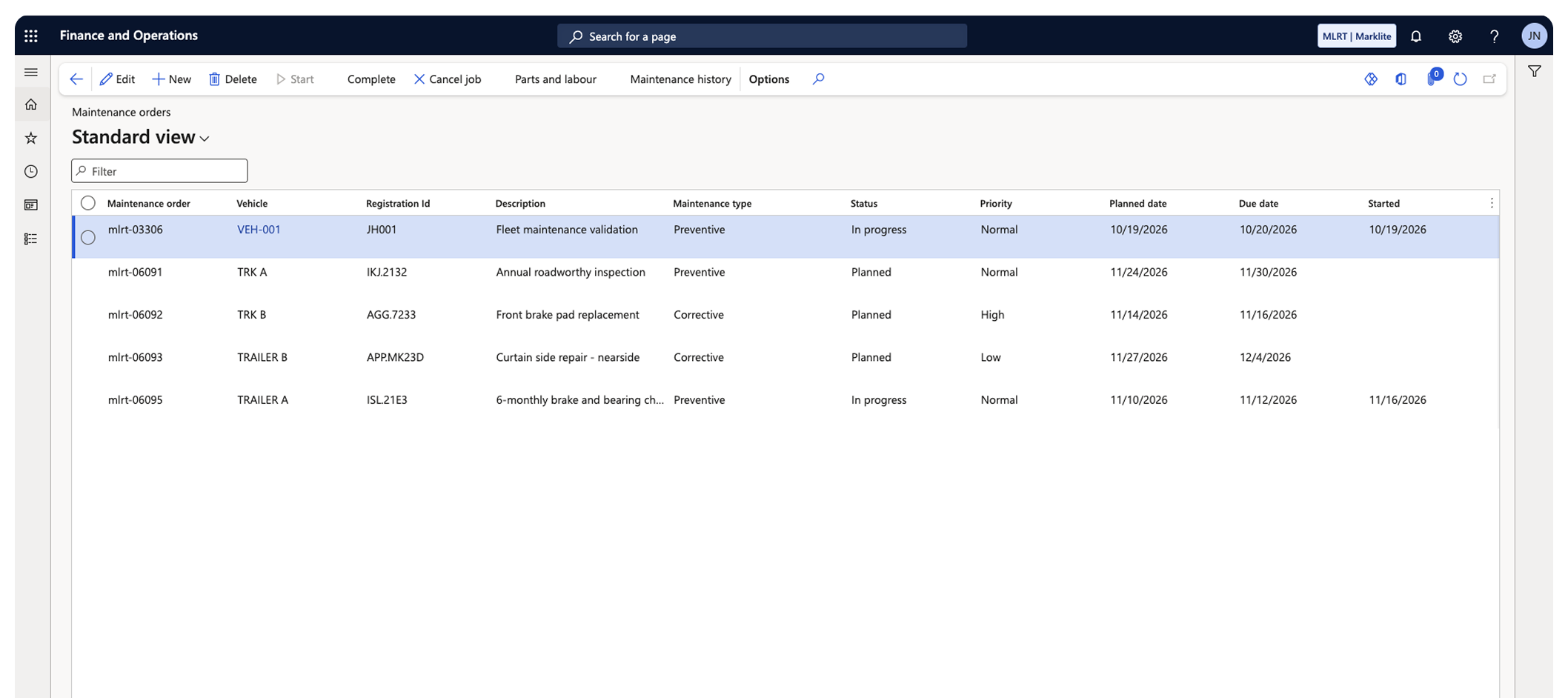
Organize preventive and corrective maintenance against vehicles and trailers, with clear priorities and planned dates.
- Record maintenance orders against the relevant vehicle or trailer.
- Review maintenance type, priority, status, and due date.
- Track work through completion, with access to parts, labour, and maintenance history.
Compliance
Inspection checklists
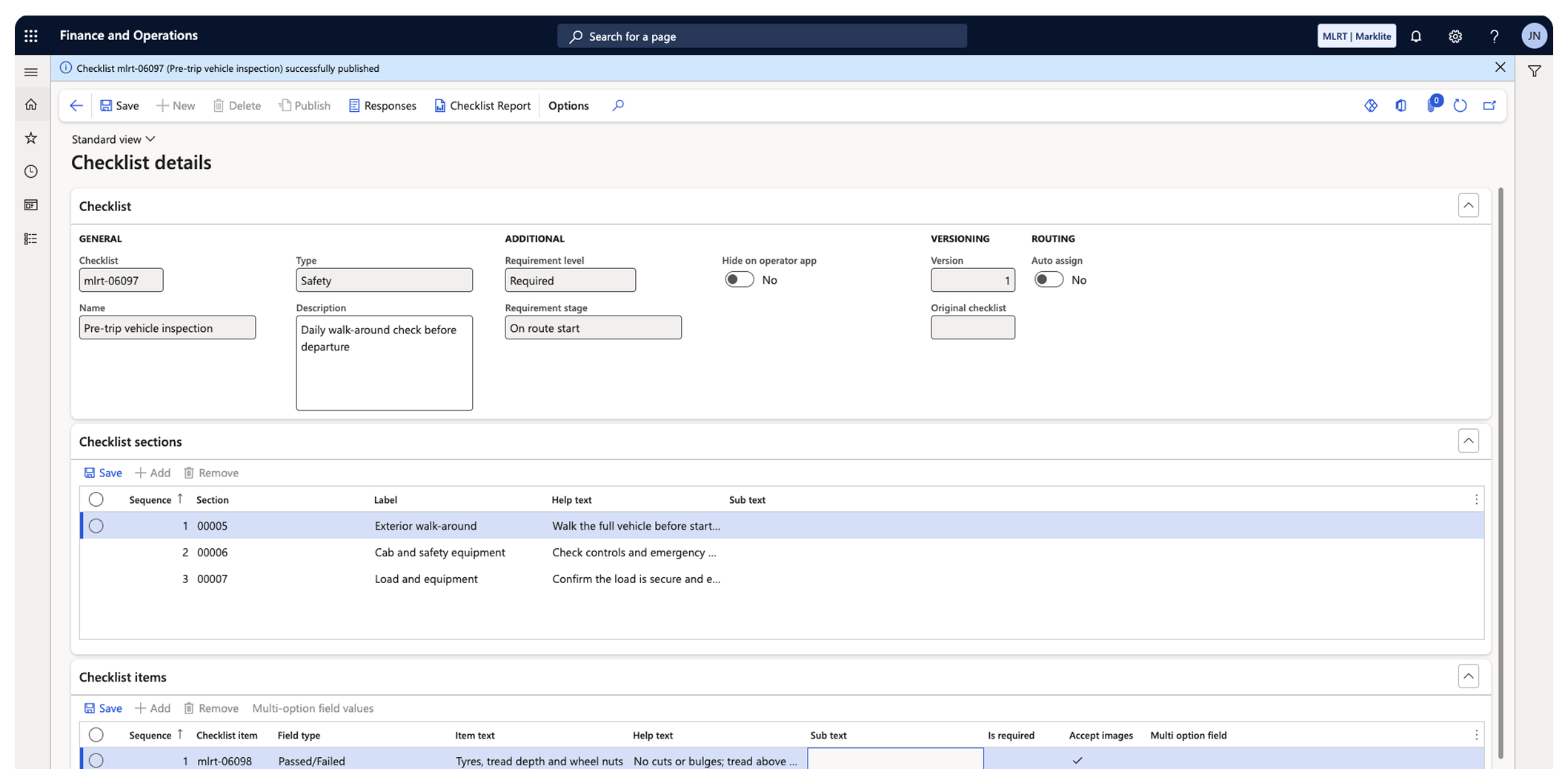
Configure a pre-trip vehicle inspection with defined sections, response fields, and a required route stage.
- Organize inspection sections and checklist items with supporting instructions.
- Set the checklist type, requirement level, and route stage.
- Publish the checklist and access its responses and report.
Compliance
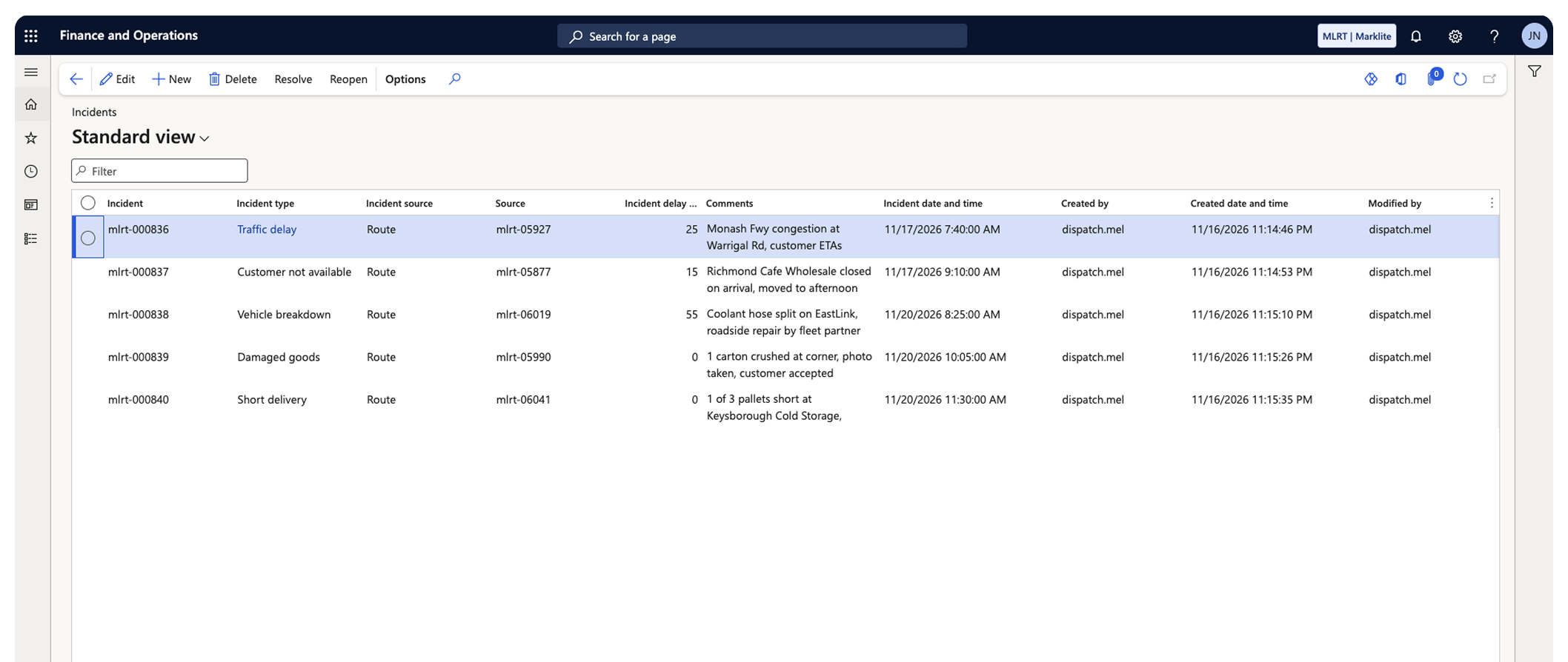
Incident Log
Review route incidents by type, reported delay, comments, and incident time to identify the recorded impact.
- Identify the incident type, source, and related route reference.
- Review the reported delay and comments for each incident.
- Check incident timestamps and the record’s creation and modification details.
Live operations
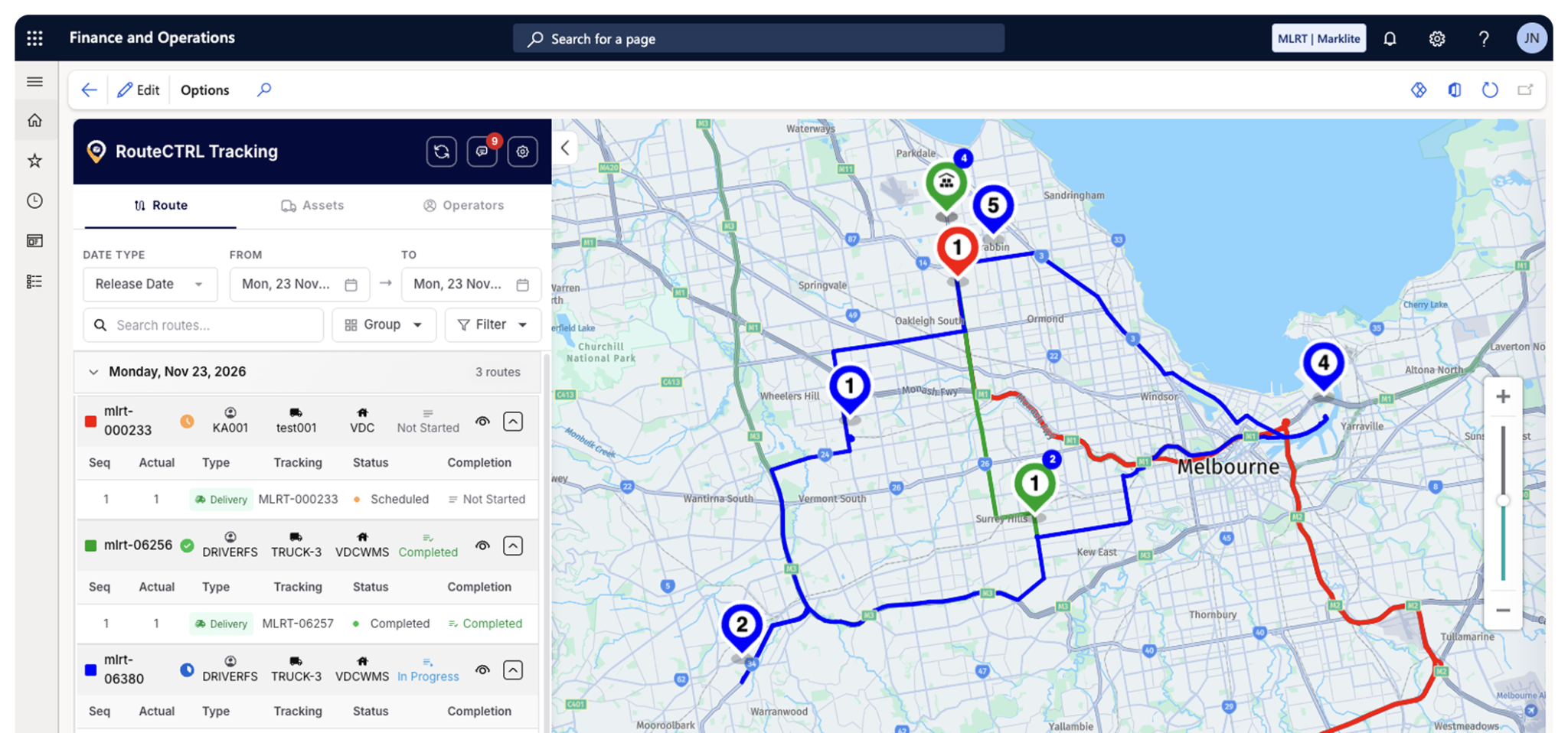
Route Tracking
Review route and stop progress alongside mapped route paths, with assigned operators and vehicles shown in the route list.
- Select the date range and use search, grouping, or filters to find routes.
- Check each route’s assigned operator, vehicle, and completion status.
- Expand a route to review stop sequences, tracking references, and individual stop statuses.
Live operations
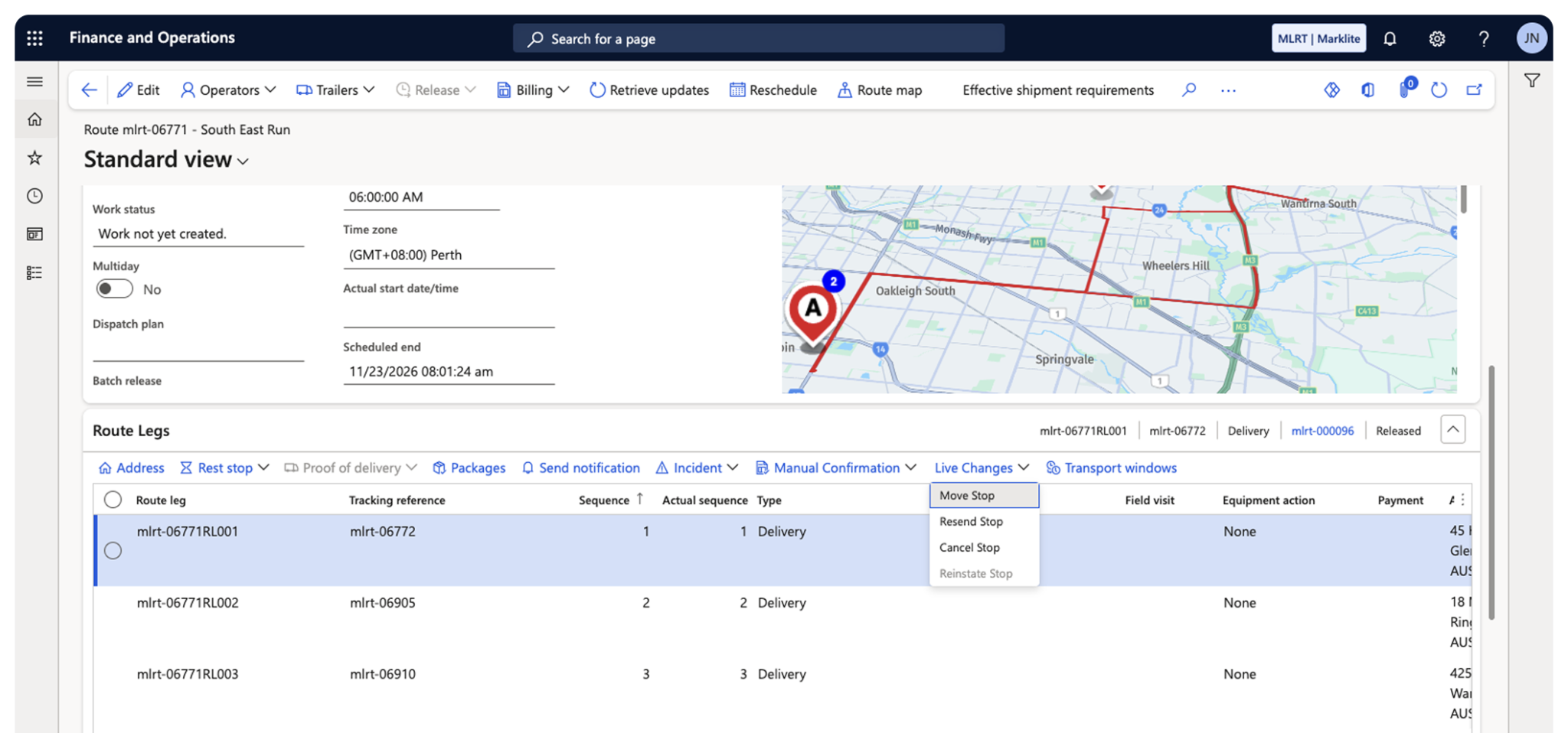
Live Route Changes
Adjust individual stops on released routes when delivery requirements change during execution.
- Move a stop to another route when its assignment needs to change.
- Cancel a stop or reinstate a previously cancelled stop.
- Resend stop details to the Operator App when an update is required.
Live operations
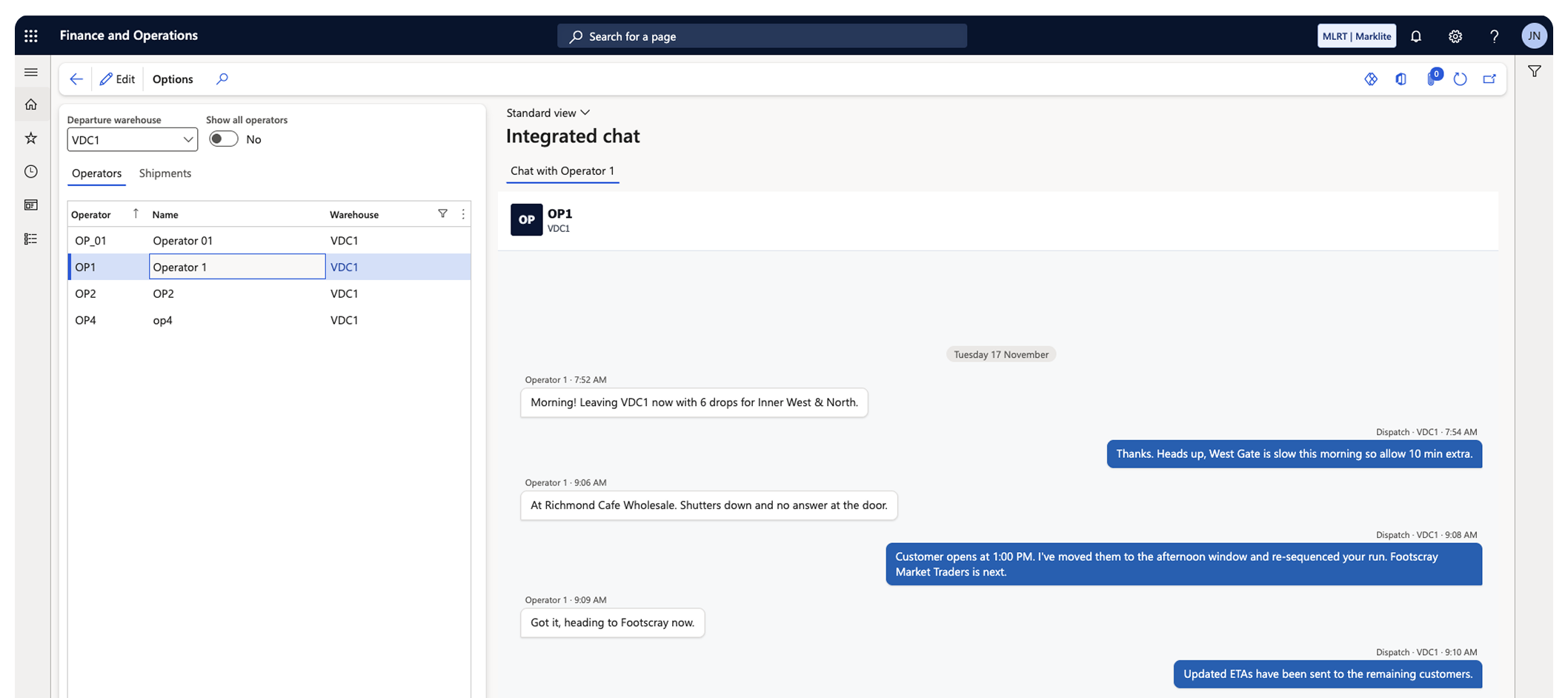
Live Communication
Exchange dispatch instructions and operator updates through a conversation history with recorded message times.
- Select an operator from the conversation list.
- Review sent and received messages with their timestamps.
- Clarify access arrangements, loading preparation, or delays within the conversation.
Live operations
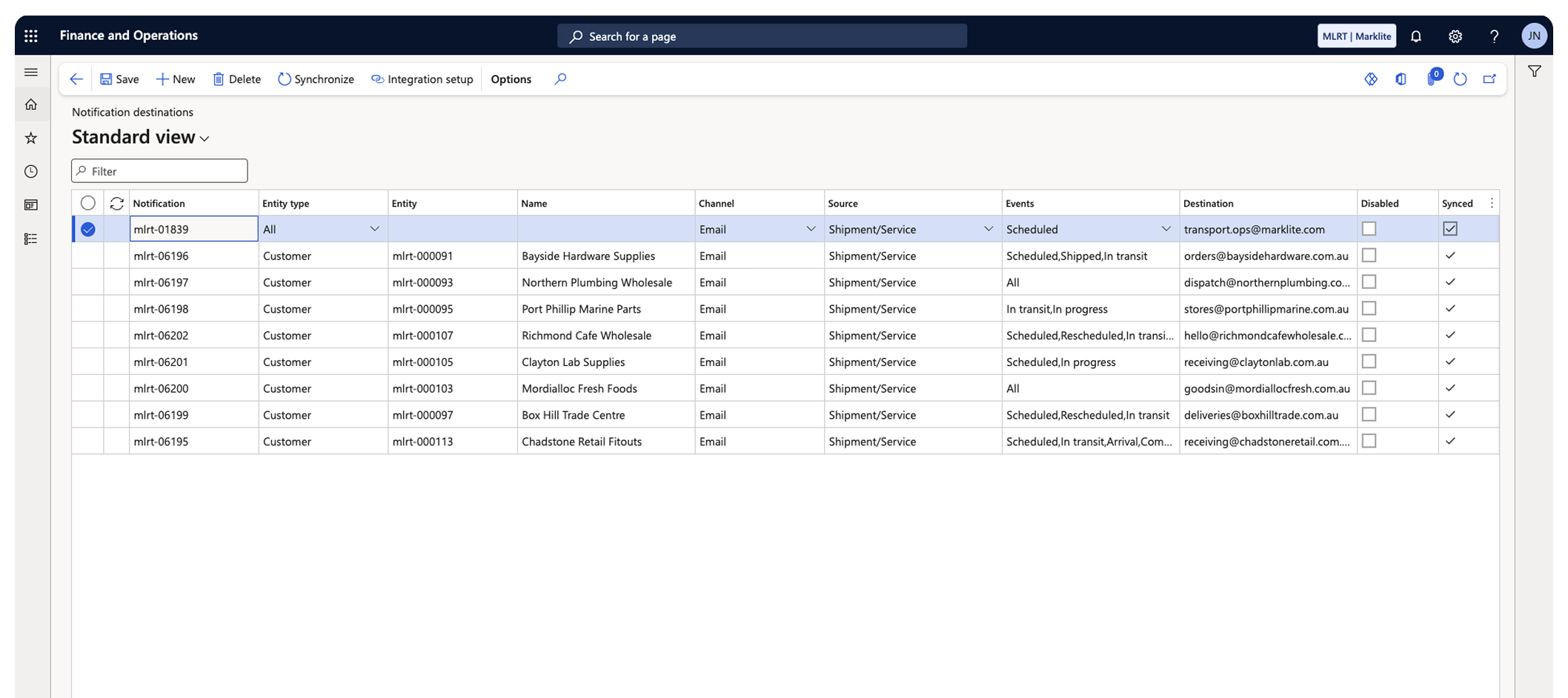
Shipment Notifications
Configure notification recipients and shipment events so each update has a defined channel and destination.
- Choose the customer, recipient group, or entity covered by the notification.
- Set the communication channel and destination address.
- Select the shipment events and review the notification’s enabled and synchronization status.
Cost
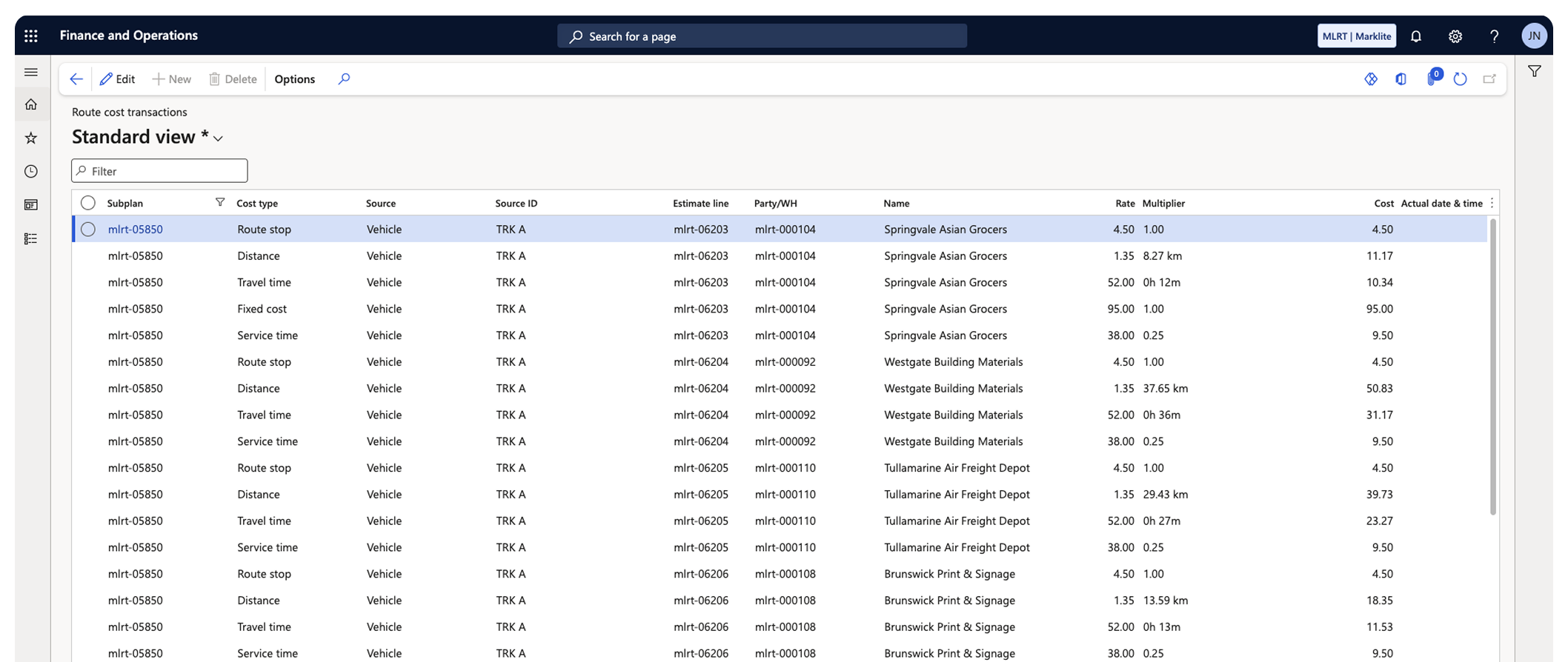
Transport Cost
Review route cost lines by source, rate, and quantity to understand how each recorded amount is calculated.
- Identify the subplan, vehicle, and customer associated with each cost entry.
- Review stop, distance, travel-time, service-time, and fixed-cost lines.
- Check the rate, multiplier, and resulting cost for each line.
Cost
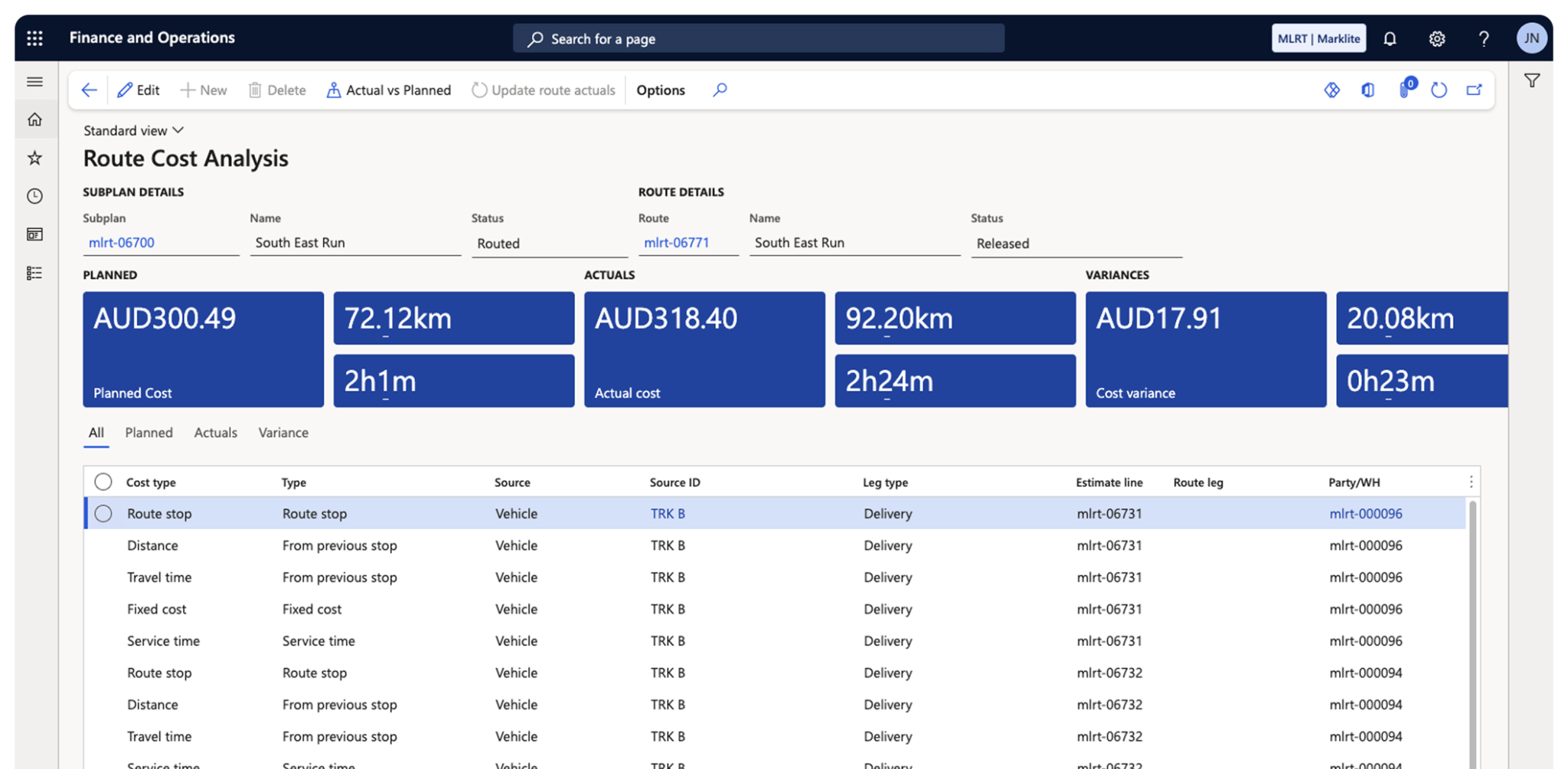
Cost Analysis
Compare planned and actual route costs to investigate where distance, duration, or operating expenses differed from the estimate.
- Review planned and actual cost, distance, and duration for each route.
- Identify overruns and savings through the recorded variances.
- Examine underlying cost entries when investigating differences.
Reports
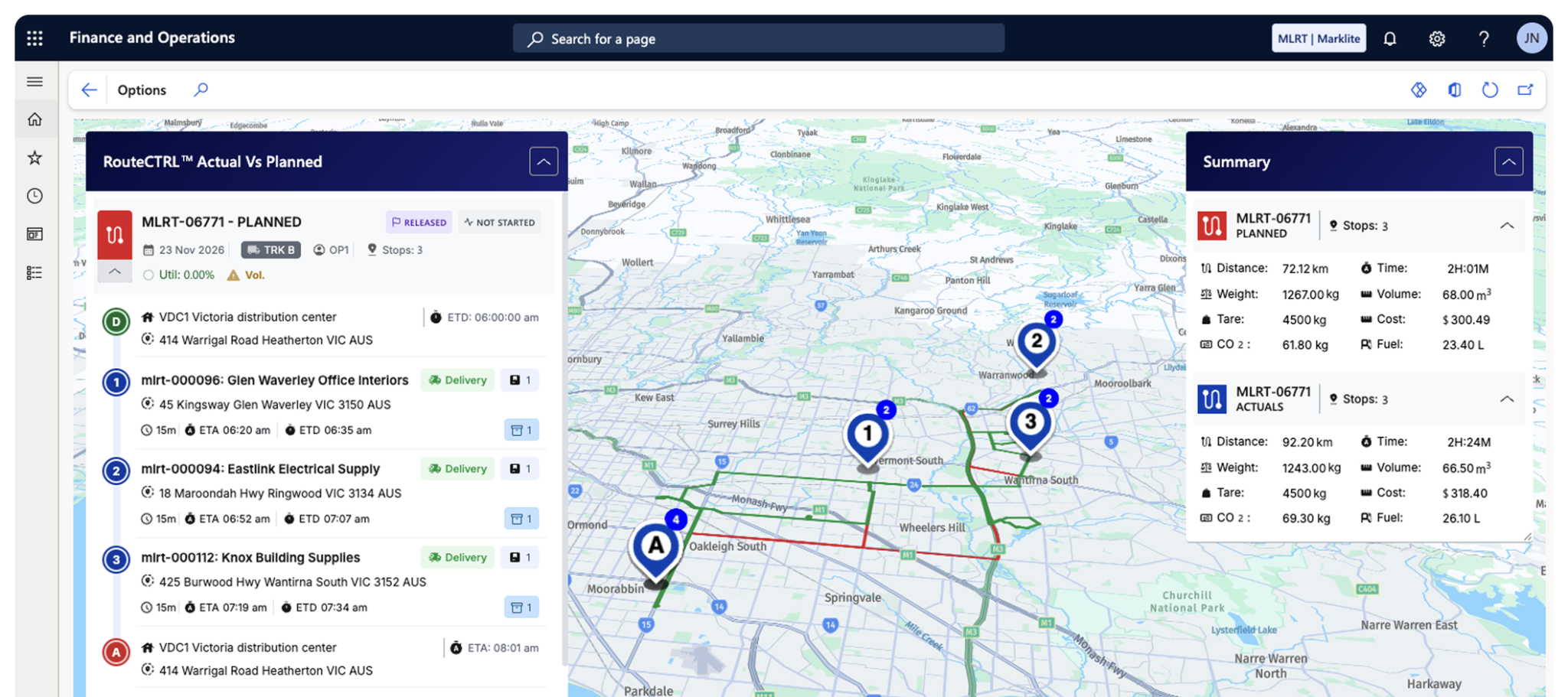
Planned vs. Actual
Compare planned and actual route paths and totals to identify differences in distance, duration, and operating cost.
- Compare the planned and actual paths on the map.
- Review distance, duration, cost, fuel, and CO₂ totals for each version of the route.
- Check mapped stop locations against the planned stop sequence.
Reports
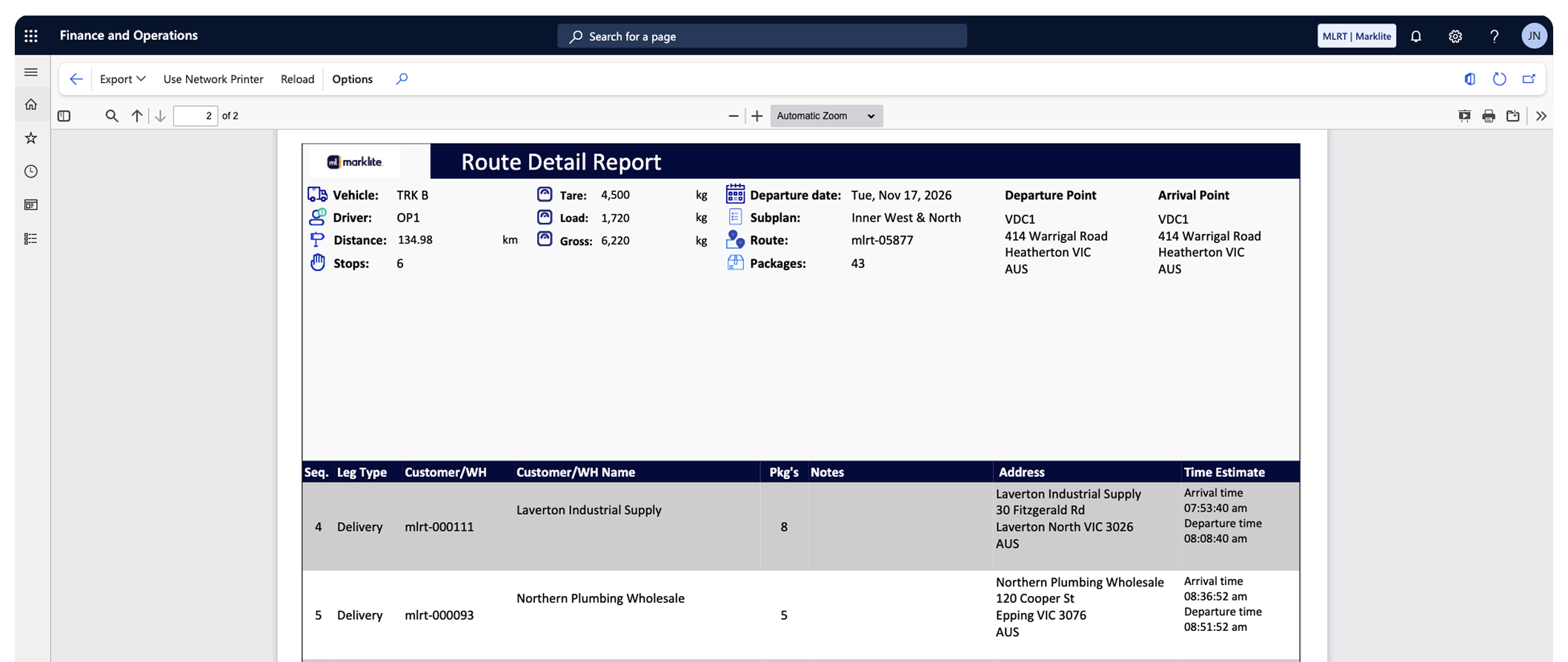
Route Detail Reports
Review each route’s assigned resources, stop details, and estimated arrival and departure times in a structured report.
- Check the vehicle, operator, departure point, and arrival point.
- Review stop sequences, customer addresses, package quantities, and notes.
- Check the estimated arrival and departure times listed for each stop.
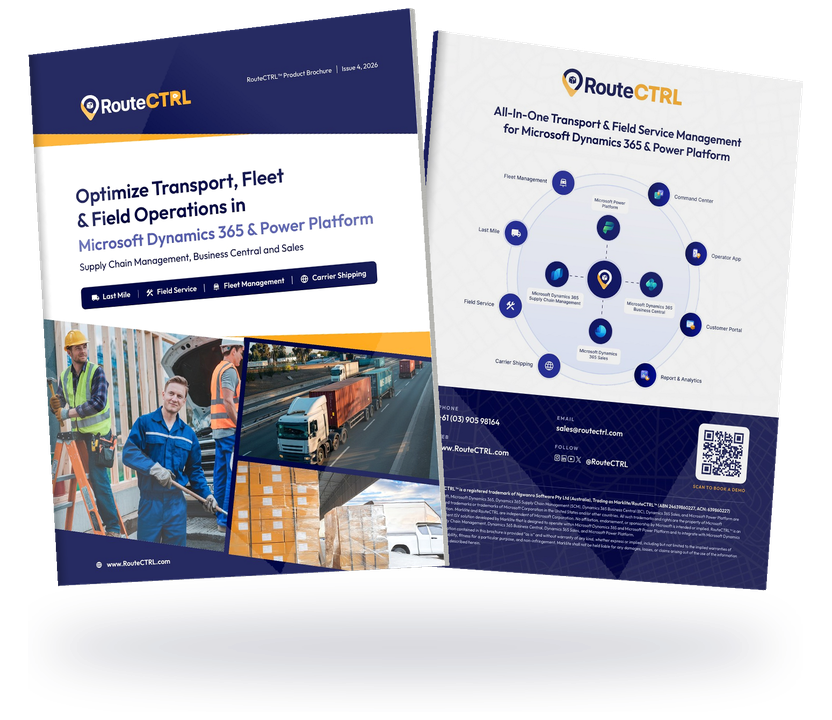
Feature brochure
Take a closer look at what RouteCTRL can do
Explore the features across RouteCTRL’s application suite and identify the capabilities that matter to your operation.
Insights & resources
Find practical answers to transport challenges

Win a LEGO Technic McLaren P1 at Convergence 2026: Visit RouteCTRL at Booth 110
Visit RouteCTRL at Booth 110 at Convergence 2026 to enter a free prize draw for a LEGO Technic McLaren P1, Sony ULT WEAR Headphones or a JBL Clip 5 Speaker.
Read article: Win a LEGO Technic McLaren P1 at Convergence 2026: Visit RouteCTRL at Booth 110
How to Plan Deliveries Backward from the Promised Date in Dynamics 365
Compare the cost and the service impact of each delivery plan before any route is built
Read article: How to Plan Deliveries Backward from the Promised Date in Dynamics 365
When Spreadsheet Route Planning Stops Working: Signs It’s Time to Plan Inside Dynamics 365
Eight signs, how to measure each one, and what changes when routes are planned on the order records
Read article: When Spreadsheet Route Planning Stops Working: Signs It’s Time to Plan Inside Dynamics 365
How to Add Route Planning to Dynamics 365 Without Disrupting Dispatch
Set up, pilot and roll out RouteCTRL one warehouse at a time, with each team's changes agreed before go-live
Read article: How to Add Route Planning to Dynamics 365 Without Disrupting Dispatch
How to Plan Delivery and Pickup Routes from Business Central Orders
Select orders, compare route options by cost and release routes with RouteCTRL, fully integrated into Microsoft Dynamics 365 Business Central
Read article: How to Plan Delivery and Pickup Routes from Business Central Orders
Route Planning in Microsoft Dynamics 365 and Power Platform
How to plan, dispatch and track delivery, pickup and field service routes from your Microsoft records
Read article: Route Planning in Microsoft Dynamics 365 and Power Platform
RouteCTRL is Heading to Ghana for DynamicsCon Regional: Africa 2026
RouteCTRL is proud to be part of DynamicsCon Regional: Africa 2026 in Accra, where we’ll be showcasing how Dynamics 365 users can simplify transport, field service, fleet, and mobile operations with one connected execution platform.
Read article: RouteCTRL is Heading to Ghana for DynamicsCon Regional: Africa 2026
Returns Are Transport Execution Too
Returns should not become a side process after delivery fails. This article examines why return pickups need route-level control, how visibility breaks down in reverse logistics, and how Dynamics 365 users can manage returns as part of transport execution.
Read article: Returns Are Transport Execution TooFAQ
Frequently Asked Questions
Find answers about RouteCTRL’s capabilities, Microsoft platform requirements, and licensing options for your operation.
RouteCTRL adds ERP-embedded transport planning and dispatch to Microsoft Dynamics 365 Supply Chain Management. Planners use existing business records to organize routes, assign resources, and release assignments to the Operator App. Reported execution outcomes remain connected to the related orders and shipments.
RouteCTRL lets Dynamics 365 Supply Chain Management planners select the orders to include, apply reusable order selection presets, and organize the selected demand into routes. Planners review resources and stop requirements before generating and releasing the route, so the assignment starts from the business records already in Supply Chain Management.
RouteCTRL uses recorded resource availability, vehicle capacity, and capabilities to support operator and vehicle assignment. Dynamics 365 Supply Chain Management planners review those records against route requirements before release. Accurate availability and capability records help prevent assignments that cannot meet the planned activity.
RouteCTRL supports multi-site transport planning with Microsoft Dynamics 365 Supply Chain Management, Business Central, Sales, and Microsoft Power Platform. Teams configure planning rules, resource assignments, and user access around each site’s requirements. For Supply Chain Management deployments, licensing and operational setup must also account for the legal entities involved.
The RouteCTRL Operator App sends delivery confirmations, operator check-ins, route progress, and checklist responses when connected. Dynamics 365 Supply Chain Management office teams review the returned execution information through the configured workflow. Activity recorded offline reaches the office after the device reconnects and synchronizes.
RouteCTRL delivery completion records the operator’s reported outcome and proof. Shipment posting, inventory updates, and invoicing are separate Dynamics 365 Supply Chain Management processes. Any automation of those actions must be defined in the implementation scope rather than inferred from a completed stop or captured signature.
A RouteCTRL implementation in Dynamics 365 Supply Chain Management covers planning rules, resource records, user access, mobile execution, testing, and training. Customers or their Microsoft partners can use the supplied implementation documentation and standard guidance. RouteCTRL-led implementation is an optional service for larger deployments.
A RouteCTRL feature license applies to one Dynamics 365 Supply Chain Management legal entity. Last Mile & Fleet Operations requires an initial minimum purchase of five vehicle licenses, while Field Service has a separate feature license. Additional access, resources, and services are licensed where required. Microsoft licenses remain separate.
Licensing combines operational feature licenses with additional access, resource, and service licenses where required.
A feature license applies to one Dynamics 365 Business Central company or one Supply Chain Management legal entity. Last Mile & Fleet Operations requires an initial minimum purchase of five vehicle licenses. Field Service has a separate feature license.
Licensing Last Mile & Fleet Operations, Field Service, or both includes one shared RouteCTRL office-access entitlement per environment: one Administrator, one Functional Manager, and unlimited Read-Only Users.
Additional Administrator and Functional Manager users require additional RouteCTRL licenses. Microsoft licensing remains separate.
The published price list shows monthly rates for reference. Payment is billed annually in advance for a 12-month subscription term per licensed entity.
Microsoft Dynamics 365 licensing, tracking hardware, connectivity, and third-party messaging charges are separate unless specifically included in a quotation. Implementation, customization, and professional services may also be quoted separately.
Standard implementation documentation and guidance are distinct from a RouteCTRL-managed implementation service.
Additional vehicles, operators, users, and services can be licensed as requirements change. Configuration and rollout work depend on what is being added.
Additional quantities are priced under the terms applicable when purchased. Total licensed quantities are reassessed at renewal. Reductions and other subscription changes depend on the applicable agreement.
Discuss the proposed scope with RouteCTRL before committing to licenses. Confirm minimum quantities, duration, charges, success criteria, and how the pilot would move into a production subscription. Any proposed pilot arrangement should be assessed against the published licensing terms.
The RouteCTRL team can review your operational requirements, resource quantities, user roles, and optional services. Use that deployment scope and the current price list to establish the required license mix and expected charges before purchase.