Advanced Package Management in Dynamics 365: Recording Package Changes at Delivery

In ERP-driven logistics, accuracy at the package level makes or breaks operations. A single short item or damaged carton can ripple across inventory, billing, and customer satisfaction. RouteCTRL’s Advanced Package Management (APM), integrated with Dynamics 365 Supply Chain Management and Business Central, closes this gap by giving drivers real-time control at the point of delivery and syncs those changes back to Dynamics 365.
How It Works in Dynamics 365 Supply Chain Management and Business Central
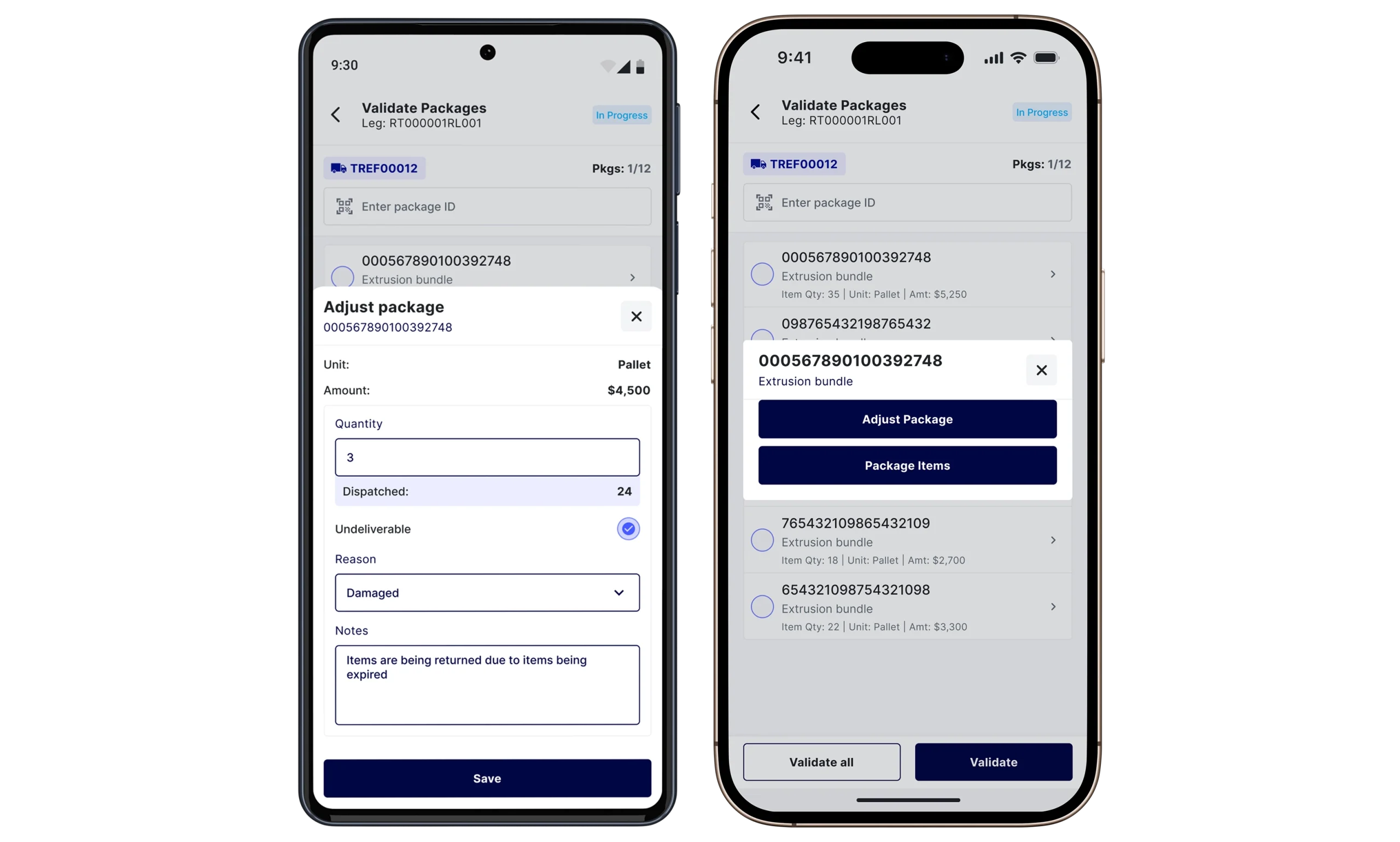
With APM, your drivers manage packages directly in the RouteCTRL Operator App, while the changes sync back to Dynamics 365.
Key Capabilities:
- Item-Level Adjustments: Drivers can adjust package quantities and record discrepancies, such as damaged or missing goods.
- Reason Codes & Notes: Operators can record a reason and add notes for each adjustment, so every change is explained in the record.
- Evidence Capture: Barcodes identify and validate packages, and photos and signatures are captured as proof for the stop.
- ERP Synchronization: Adjustments sync to Dynamics 365 Supply Chain Management or Business Central when the app is connected. Delivered quantities can update the related orders, depending on your configuration.
Real-World Use Cases
- Damaged Goods: A driver scans the package, flags it as damaged, enters a reason code, adds notes (e.g., “Items expired”), and attaches a photo. The adjustment syncs to Dynamics 365, where the return can be processed.
- Short Items: A carton is missing; the driver adjusts the count, selects the reason, and the adjusted quantity syncs to Dynamics 365 for reconciliation.
- Customer Refusal: If a customer declines delivery, the driver logs the refusal with notes, and the goods can be captured as a return so they come back into stock.
Measurable Outcomes
- Fewer Disputes: Adjustment records with photos, notes and reasons reduce customer claims and write-offs.
- Faster Returns: Undeliverable items are logged with context in the field, so the warehouse knows what is coming back.
- Customer Trust: Transparent, ERP-synced updates keep customers and managers aligned on exactly what was delivered, refused, or returned.
Why RouteCTRL APM Is Different
Dynamics 365 on its own provides packing and shipping. RouteCTRL extends it into the field, so package changes are recorded by the driver and synced back to Dynamics 365.
See it in a demo
Package discrepancies will always exist. The difference is whether they derail operations or are captured and reconciled in the same record. With RouteCTRL Advanced Package Management, Dynamics 365 keeps one record of what left the warehouse and what reached the customer.
Book a demo now to see item-level package control inside Dynamics 365 Supply Chain Management and Business Central.